How to replace a specific text in an existing DOCX document using C# and .NET
This code example shows how to replace the text 'document' by the 'book' text in a document
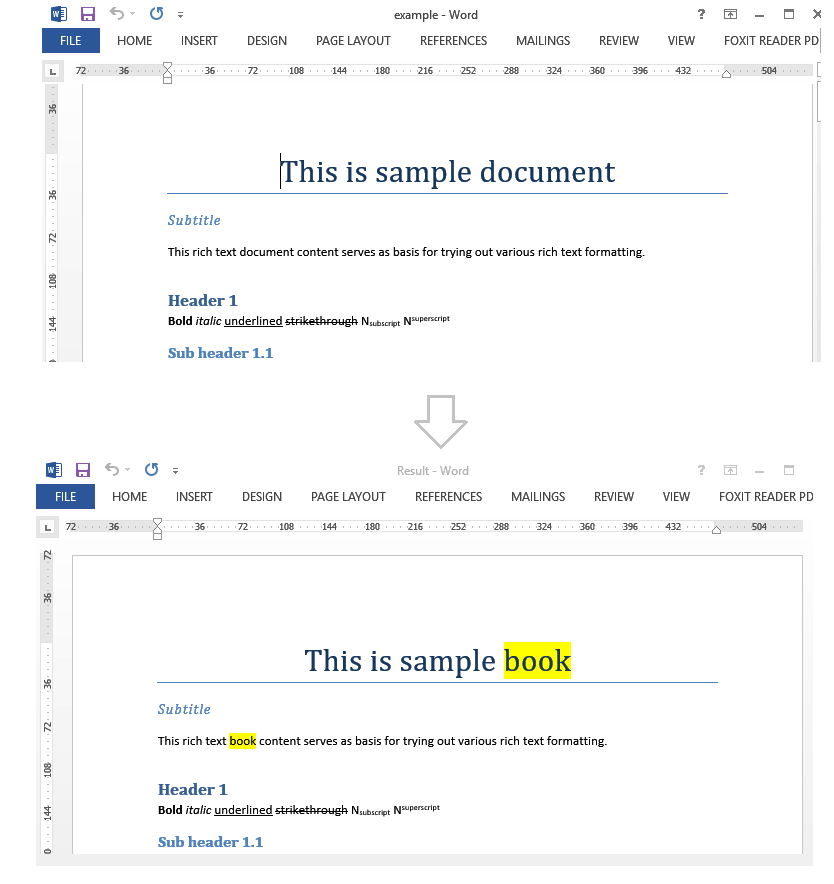
Complete code
 GitHub
using System.Linq;
using SautinSoft.Document;
namespace Example
{
class Program
{
static void Main(string[] args)
{
ReplaceText();
}
/// <summary>
/// Replace a specific text in an existing DOCX document.
/// </summary>
/// </remarks>
/// Details: https://sautinsoft.com/products/document/help/net/developer-guide/replace-text-in-docx-document-net-csharp-vb.php
/// </remarks>
static void ReplaceText()
{
string filePath = @"..\..\..\example.docx";
string fileResult = @"Result.docx";
string searchText = "document";
string replaceText = "book";
DocumentCore dc = DocumentCore.Load(filePath);
foreach (ContentRange cr in dc.Content.Find(searchText).Reverse())
{
// Replace "document" to "book";
// Mark "book" by yellow.
cr.Replace(replaceText, new CharacterFormat() { BackgroundColor = Color.Yellow});
}
dc.Save(fileResult);
System.Diagnostics.Process.Start(new System.Diagnostics.ProcessStartInfo(filePath) { UseShellExecute = true });
System.Diagnostics.Process.Start(new System.Diagnostics.ProcessStartInfo(fileResult) { UseShellExecute = true });
}
}
}Imports System.Linq
Imports SautinSoft.Document
Namespace Example
Friend Class Program
Shared Sub Main(ByVal args() As String)
ReplaceText()
End Sub
''' <summary>
''' Replace a specific text in an existing DOCX document.
''' </summary>
''' </remarks>
''' Details: https://sautinsoft.com/products/document/help/net/developer-guide/replace-text-in-docx-document-net-csharp-vb.php
''' </remarks>
Private Shared Sub ReplaceText()
Dim filePath As String = "..\..\..\example.docx"
Dim fileResult As String = "Result.docx"
Dim searchText As String = "document"
Dim replaceText As String = "book"
Dim dc As DocumentCore = DocumentCore.Load(filePath)
For Each cr As ContentRange In dc.Content.Find(searchText).Reverse()
' Replace "document" to "book";
' Mark "book" by yellow.
cr.Replace(replaceText, New CharacterFormat() With {.BackgroundColor = Color.Yellow})
Next cr
dc.Save(fileResult)
System.Diagnostics.Process.Start(New System.Diagnostics.ProcessStartInfo(filePath) With {.UseShellExecute = True})
System.Diagnostics.Process.Start(New System.Diagnostics.ProcessStartInfo(fileResult) With {.UseShellExecute = True})
End Sub
End Class
End Namespace
If you need a new code example or have a question: email us at support@sautinsoft.com or ask at Online Chat (right-bottom corner of this page).