Import an Element with Styles in mode KeepSourceFormatting using C# and .NET
- Add SautinSoft.Document from Nuget.
- Load a source DOCX document.
- Create a new destination document.
- Create a new style "MyGreen".
- Import a paragraph and style "Green".
- Save the destination document.
KeepSourceFormatting means to copy all required styles to the destination document, generate unique style names if needed.
For example, a destination document contains a style "Green" (Calibri, FontSize = 20, Green, Underline).
Destination:
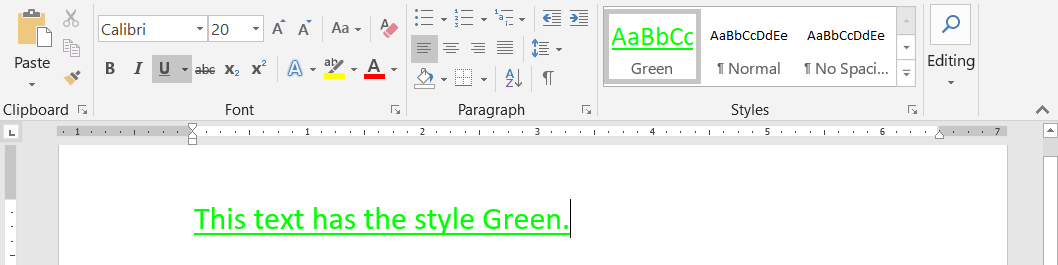
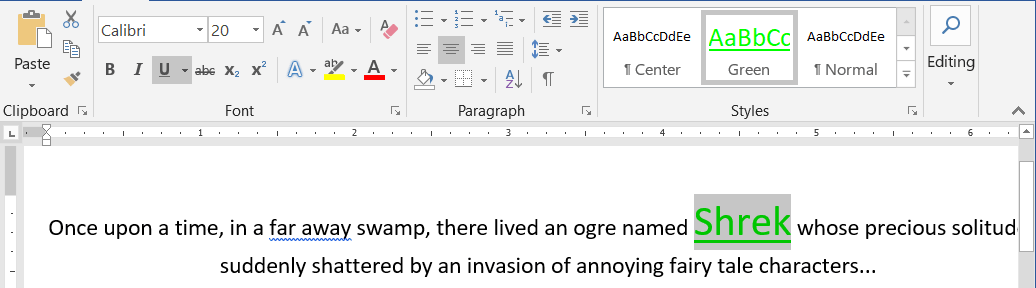
And a source document also contains an equal style with the same name "Green" (Calibri, FontSize = 20, Green, Underline).
Let's import a 1st paragraph from the source document.
The paragraph contains text "Shrek" marked by an equal style with the same name "Green" (Calibri,
FontSize = 20, Green, Underline).
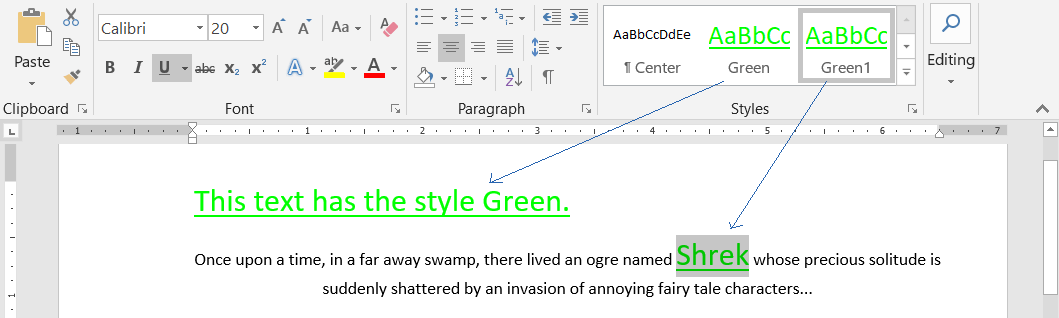
The style "Green" will be imported and renamed to "Green1".
Source:
After the importing, all imported elements will be remapped to style "Green1".:
Result:
Complete code
 GitHub
using SautinSoft.Document;
using SautinSoft.Document.Tables;
using System.Linq;
namespace Sample
{
class Sample
{
static void Main(string[] args)
{
// Get your free 30-day key here:
// https://sautinsoft.com/start-for-free/
ImportKeepSourceFormatting();
}
/// <summary>
/// Import an Element with Styles from another document. Mode: KeepSourceFormatting.
/// </summary>
/// <remarks>
/// Details: https://www.sautinsoft.com/products/document/help/net/developer-guide/import-element-keep-source-formatting.php
/// </remarks>
private static void ImportKeepSourceFormatting()
{
// Mode: KeepSourceFormatting.
// 'KeepSourceFormatting' means to copy all required styles to the destination document,
// generate unique style names if needed.
// For example, a destination document contains a style "Green" (Calibri, FontSize = 20, Green, Underline).
// And a source document also contains an equal style with the same name "Green" (Calibri, FontSize = 20, Green, Underline).
// The style "Green" will be imported and renamed to "Green1".
// All imported elements linked to style "Green" will be remapped to style "Green1".
DocumentCore source = DocumentCore.Load(@"..\..\..\SourceStyles.docx");
DocumentCore dest = new DocumentCore();
// Let's create a style "Green" (Calibri, FontSize = 20, Green, Underline).
CharacterStyle chStyle = new CharacterStyle("Green");
chStyle.CharacterFormat.FontName = "Calibri";
chStyle.CharacterFormat.FontColor = Color.Green;
chStyle.CharacterFormat.Size = 20;
chStyle.CharacterFormat.UnderlineStyle = UnderlineType.Single;
dest.Styles.Add(chStyle);
dest.Content.End.Insert(new Run(dest, "This text has the style Green.", new CharacterFormat() { Style = chStyle }).Content);
// Create an ImportSession with mode 'KeepSourceFormatting'.
ImportSession session = new ImportSession(source, dest, StyleImportingMode.KeepSourceFormatting);
// Let's import a paragraph.
// The imported paragraph contains a text with style "Green" (FontSize = 20, Green, Underline).
// The style "Green" will be imported and renamed to "Green1", because we already have "Green".
// All links in imported paragraph will be remapped to the style "Green1".
Paragraph importedPar = dest.Import<Paragraph>((Paragraph)source.Sections[0].Blocks[0], true, session);
dest.Content.End.Insert(importedPar.Content);
// Save the destination document into DOCX format.
string docPath = "KeepSourceFormatting.docx";
dest.Save(docPath);
// Open the result for demonstration purposes.
System.Diagnostics.Process.Start(new System.Diagnostics.ProcessStartInfo(docPath) { UseShellExecute = true });
}
}
}Imports SautinSoft.Document
Imports SautinSoft.Document.Tables
Imports System.Linq
Namespace Sample
Friend Class Sample
Shared Sub Main(ByVal args() As String)
ImportKeepSourceFormatting()
End Sub
''' Get your free 30-day key here:
''' https://sautinsoft.com/start-for-free/
''' <summary>
''' Import an Element with Styles from another document. Mode: KeepSourceFormatting.
''' </summary>
''' <remarks>
''' Details: https://www.sautinsoft.com/products/document/help/net/developer-guide/import-element-keep-source-formatting.php
''' </remarks>
Private Shared Sub ImportKeepSourceFormatting()
' Mode: KeepSourceFormatting.
' 'KeepSourceFormatting' means to copy all required styles to the destination document,
' generate unique style names if needed.
' For example, a destination document contains a style "Green" (Calibri, FontSize = 20, Green, Underline).
' And a source document also contains an equal style with the same name "Green" (Calibri, FontSize = 20, Green, Underline).
' The style "Green" will be imported and renamed to "Green1".
' All imported elements linked to style "Green" will be remapped to style "Green1".
Dim source As DocumentCore = DocumentCore.Load("..\..\..\SourceStyles.docx")
Dim dest As New DocumentCore()
' Let's create a style "Green" (Calibri, FontSize = 20, Green, Underline).
Dim chStyle As New CharacterStyle("Green")
chStyle.CharacterFormat.FontName = "Calibri"
chStyle.CharacterFormat.FontColor = Color.Green
chStyle.CharacterFormat.Size = 20
chStyle.CharacterFormat.UnderlineStyle = UnderlineType.Single
dest.Styles.Add(chStyle)
dest.Content.End.Insert((New Run(dest, "This text has the style Green.", New CharacterFormat() With {.Style = chStyle})).Content)
' Create an ImportSession with mode 'KeepSourceFormatting'.
Dim session As New ImportSession(source, dest, StyleImportingMode.KeepSourceFormatting)
' Let's import a paragraph.
' The imported paragraph contains a text with style "Green" (FontSize = 20, Green, Underline).
' The style "Green" will be imported and renamed to "Green1", because we already have "Green".
' All links in imported paragraph will be remapped to the style "Green1".
Dim importedPar As Paragraph = dest.Import(Of Paragraph)(CType(source.Sections(0).Blocks(0), Paragraph), True, session)
dest.Content.End.Insert(importedPar.Content)
' Save the destination document into DOCX format.
Dim docPath As String = "KeepSourceFormatting.docx"
dest.Save(docPath)
' Open the result for demonstration purposes.
System.Diagnostics.Process.Start(New System.Diagnostics.ProcessStartInfo(docPath) With {.UseShellExecute = True})
End Sub
End Class
End NamespaceIf you need a new code example or have a question: email us at support@sautinsoft.com or ask at Online Chat (right-bottom corner of this page).