Convert Word to PDF Factur-X file in C# and .NET
Factur-X, a standard adopted in Germany and across Europe, facilitates hybrid electronic invoices by merging visual PDF elements with structured XML information. It leverages the ISO 19005-3:2012 (PDF/A-3) standard, which allows for the integration of XML within PDF documents, ensuring both persistent storage and streamlined automated data handling.
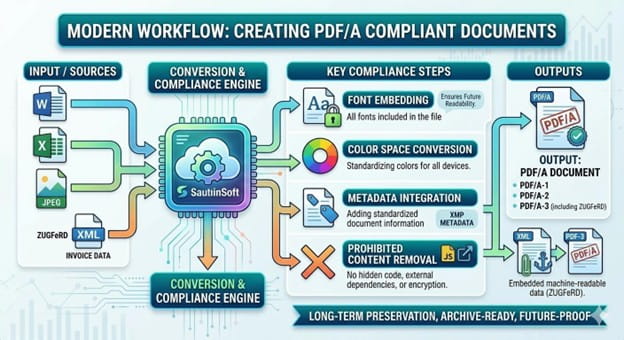
Fundamental elements of Factur-X and ISO:
Factur-X leverages the ISO 19005-3 standard (PDF/A-3) to integrate any file type, specifically XML, directly into a PDF. This integration ensures that data can be automatically extracted, all while preserving a user-friendly, readable format.
This hybrid PDF combines a user-friendly invoice with machine-readable structured information (typically UN/CEFACT CII), allowing for seamless integration and automated processing within accounting software.
Factur-X adheres to the European standard EN 16931, ensuring its alignment with established guidelines for electronic invoices.
The Factur-X format employs two-letter country codes that adhere to the ISO 3166-1 standard for identification (such as DE, AT, and FR).
More recent versions of Factur-X, starting with 2.0, are commonly known as ZUGFeRD, highlighting their global interoperability.
Step-by-step:
- Define a path variable pointing to the folder containing the input Word: RTF, DOCX, DOC and output PDF files. And the path and description of another file named "Factur.xml" that contains invoice metadata that complies with the Factur-X standard.
- Create a document object by loading an existing DOCX file (e.g., " example.docx") from the path.
- Upload the PDF document you want to convert to PDF/A3 format.
- Adding metadata from the XML file.
- Save the result as a new PDF/A3 document based on Factur-X ISO.
Code Snippet:
            string inpFile = @"..\..\..\example.docx";
            string xmlInfo = File.ReadAllText(@"..\..\..\Factur-X\Factur.xml");

            string outFile = @"..\..\..\FacturXResult.pdf";

            DocumentCore dc = DocumentCore.Load(inpFile);

            PdfSaveOptions pdfSO = new PdfSaveOptions()
            {
             FacturXXML = xmlInfo
            };
            dc.Save(outFile, pdfSO);
Key Features:
- Create hybrid PDFs that comply with ZUGFeRD 2.2.
- Integrate XRechnung XML directly into PDF/A-3.
- Support all ZUGFeRD profiles (Basic, Comfort, Extended).
- Automatic validation and conversion of PDFs to A-3.
- Maintain the original PDF layout and design; support digital signatures for authenticity; and comply with all German tax regulations.
Document .Net by SautinSoft supports Factur-X, which is fully compatible with XRechnung and European standard EN 16931. This ensures maximum compatibility across German and European systems.
SautinSoft solutions allow to convert any Word documents to PDF/A-3 with embedded XML meeting all requirements and you will get mandatory compliance for German public sector invoicing, Automatic Leitweg-ID validation for government routing, Built-in validation for France tax regulations.
Standards support: The library supports Factur-X (ZUGFeRD 2.2), which complies with the European standard EN 16931.
PDF/A-1A, PDF/A-1B, PDF/A-2A, PDF/A-2B, PDF/A-2U, PDF/A-3A, PDF/A-3B, PDF/A-3U, PDF/A-4E.
Cross-platform: Works on Windows, Linux, and macOS (.NET 6/7/8/9/10, Net Framework 4.6 -4.8, Standard).
Complete code
 GitHub
using SautinSoft;
using SautinSoft.Document;
using System;
using System.IO;
using System.Reflection;
namespace Sample
{
class Sample
{
/// <summary>
/// Convert Word to PDF (Factur-X) using C# and .NET.
/// </summary>
/// <remarks>
/// Details: https://sautinsoft.com/products/document/help/net/developer-guide/convert-word-to-pdfa-factur-x.php
/// </remarks>
static void Main(string[] args)
{
string inpFile = @"..\..\..\example.docx";
string xmlInfo = File.ReadAllText(@"..\..\..\Factur-X\Factur.xml");
string outFile = @"..\..\..\FacturXResult.pdf";
DocumentCore dc = DocumentCore.Load(inpFile);
PdfSaveOptions pdfSO = new PdfSaveOptions()
{
// Factur-X is at the same time a full readable invoice in a PDF A/3 format,
// containing all information useful for its treatment, especially in case of discrepancy or absence of automatic matching with orders and / or receptions,
// and a set of invoice data presented in an XML structured file conformant to EN16931 (syntax CII D16B), complete or not, allowing invoice process automation.
FacturXXML = xmlInfo
};
dc.Save(outFile, pdfSO);
// Important for Linux: Install MS Fonts
// sudo apt install ttf-mscorefonts-installer -y
// Open the result for demonstration purposes.
System.Diagnostics.Process.Start(new System.Diagnostics.ProcessStartInfo(outFile) { UseShellExecute = true });
}
}
}
Imports SautinSoft
Imports SautinSoft.Document
Imports System
Imports System.IO
Imports System.Reflection

Namespace Sample
    Class Sample
        ''' <summary>
        ''' Convert Word to PDF (Factur-X) using VB.NET and .NET.
        ''' </summary>
        ''' <remarks>
        ''' Details: https://sautinsoft.com/products/document/help/net/developer-guide/convert-word-to-pdfa-factur-x.php
        ''' </remarks>
        Shared Sub Main(args As String())
            Dim inpFile As String = "..\..\..\example.docx"
            Dim xmlInfo As String = File.ReadAllText("..\..\..\Factur-X\Factur.xml")

            Dim outFile As String = "..\..\..\FacturXResult.pdf"

            Dim dc As DocumentCore = DocumentCore.Load(inpFile)

            Dim pdfSO As New PdfSaveOptions() With {
                .FacturXXML = xmlInfo
            }

            dc.Save(outFile, pdfSO)

            ' Important for Linux: Install MS Fonts
            ' sudo apt install ttf-mscorefonts-installer -y

            ' Open the result for demonstration purposes.
            Dim psi As New System.Diagnostics.ProcessStartInfo(outFile) With {
                .UseShellExecute = True
            }
            System.Diagnostics.Process.Start(psi)
        End Sub
    End Class
End NamespaceIf you need a new code example or have a question: email us at support@sautinsoft.com or ask at Online Chat (right-bottom corner of this page).