Creating 100% Compliant ZUGFeRD and Factur-X Invoices using MailMerge in C# .NET using Document .Net
Factur-X is a new French and German standard for electronic invoicing, expanding the German ZUGFeRD standard. It represents the first implementation of the European Commission’s European Semantic Standard EN 16931, introduced in 2017 by the FNFE-MPE. Factur-X belongs to a class of e-invoices known as mixed or hybrid invoices, that combine PDFs for users and XML data for automated processing. This library uses Factur-X version 1.08.
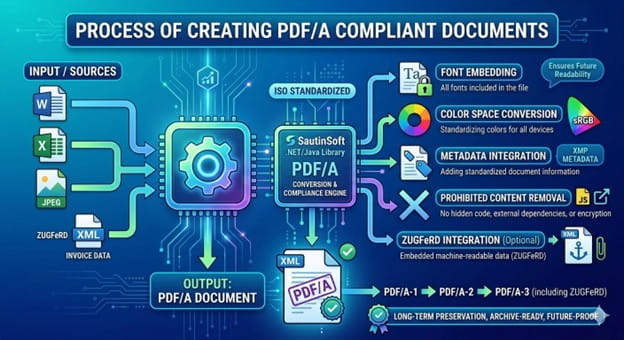
Several standard data profiles are available with more or less information:
- Minimum: Does not contain all of the invoicing information necessary for use in Germany.
- Basic WL: Does not contain all of the invoicing information necessary for use in Germany.
- Basic: Suitable for simple invoices.
- EN16931: Adds data for fully automated invoicing, covering EN 16931.
- Extended: Adds additional data for sending invoices across industries.
The ZUGFeRD / Factur-X standard is a hybrid electronic invoice format that consists of two parts:
- A PDF visual, human-readable representation of the invoice.
- An XML file that contains invoice data in a structured form that can be processed automatically.
This article shows how to use the MailMerge class to merge invoice data into a template and how to embed the generated ZUGFeRD XML to the final PDF document.
Step-by-step:
- Define a path variable pointing to the folder containing the input Docx-template and output PDF files. And the path and description of another file named "info.xml" that contains invoice metadata that complies with the ZUGFeRD standard.
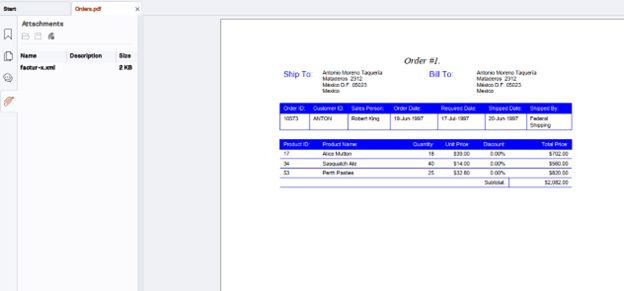
- Create a document object by loading an existing PDF file (e.g., " Orders.pdf") from the path.
- Upload the PDF document you want to convert to PDF/A3 format.
- Adding metadata from the XML file.
- Save the result as a new PDF/A3 document based on Factur-X ISO.
Code Snippet:
            // Load the DOCX-template document.
            DocumentCore document = DocumentCore.Load(@"..\..\..\OrdersDbTemplate.docx");
            string xmlInfo = File.ReadAllText(@"..\..\..\info.xml");
            string resultPath = @"..\..\..\Orders.pdf";

            // Create a data source.
            DataSet dataSet = new DataSet();

           //Create content fro invoices

            PdfSaveOptions pdfSO = new PdfSaveOptions()
            {

                FacturXXML = xmlInfo
            };

            // Save the output to file.
            document.Save(resultPath, pdfSO);

        }

        static DataTable ExecuteSQL(string sqlText)
        {
            // Open the database connection.
            string str = "Provider=Microsoft.ACE.OLEDB.12.0;Data Source=" + @"..\..\..\Northwind.mdb";
            OleDbConnection conn = new OleDbConnection(str);
            conn.Open();

            // Create and execute a command.
            OleDbCommand cmd = new OleDbCommand(sqlText, conn);
            OleDbDataAdapter da = new OleDbDataAdapter(cmd);
            DataTable table = new DataTable();
            da.Fill(table);

            // Close the database.
            conn.Close();

            return table;
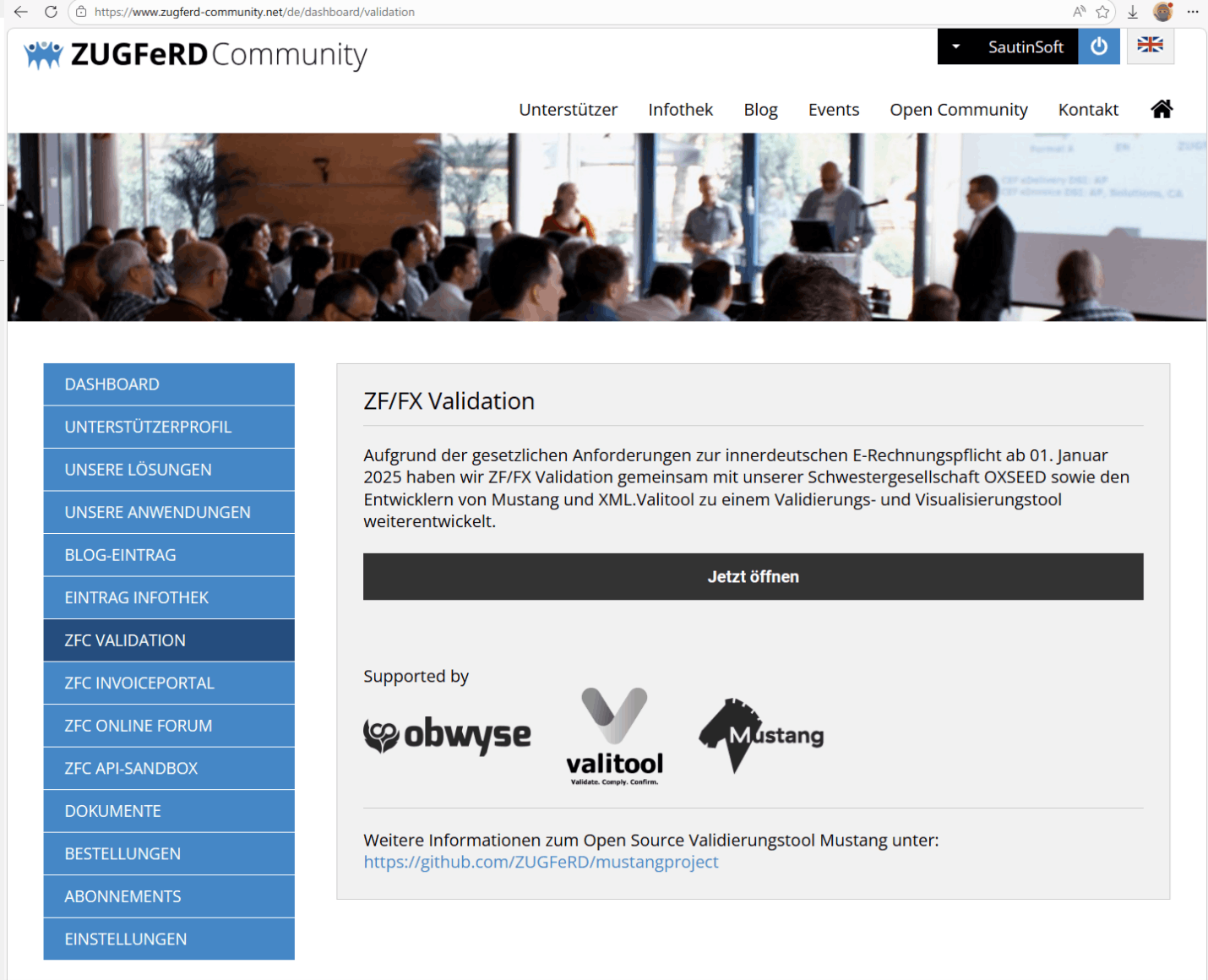
When loading this document into a ZUGFeRD validator (ZF/FX Validation), the results show a valid ZUGFeRD PDF.
Key Features:
- Generate ZUGFeRD 2.2 compliant hybrid PDFs.
- Embed XRechnung XML directly into PDF/A-3.
- Support for all ZUGFeRD profiles (Basic, Comfort, Extended).
- Automatic PDF/A-3 conversion and validation.
- Preserve original PDF layout and design.
- Digital signature support for authenticity.
- Compatible with all German tax requirements.
This library, developed in .NET/ .Net Framework, allows you to easily perform the following tasks:
- Generate a Factur-X PDF invoice in any of the available profiles.
- Extract the information contained in a Factur-X PDF invoice.
- Validate a Factur-X PDF invoice against the official Factur-X XML Schema Definition and Schematrons.
Standards support: The library supports Factur-X (ZUGFeRD 2.2), which complies with the European standard EN 16931.
PDF/A-1A, PDF/A-1B, PDF/A-2A, PDF/A-2B, PDF/A-2U, PDF/A-3A, PDF/A-3B, PDF/A-3U, PDF/A-4E.
Cross-platform: Works on Windows, Linux, and macOS (.NET 6/7/8/9/10, Net Framework 4.6 -4.8, Standard).
Complete code
 GitHub
using System.Globalization;
using System.Data;
using System.Data.OleDb;
using SautinSoft.Document;
using System.Linq;
using System.IO;
namespace Sample
{
class Sample
{
static void Main(string[] args)
{
Create_Factur_ZUGFeRD_invoices();
}
/// <summary>
/// Creating 100% Compliant ZUGFeRD and Factur-X Invoices using MailMerge in C#
/// </summary>
/// <remarks>
/// See details at: https://www.sautinsoft.com/products/document/help/net/developer-guide/create-factur-x-zugferd-invoices-net-csharp-vb.php
/// </remarks>
static void Create_Factur_ZUGFeRD_invoices()
{
// Load the DOCX-template document.
DocumentCore document = DocumentCore.Load(@"..\..\..\OrdersDbTemplate.docx");
string xmlInfo = File.ReadAllText(@"..\..\..\info.xml");
string resultPath = @"..\..\..\Orders.pdf";
// Create a data source.
DataSet dataSet = new DataSet();
// Execute query for retrieving data of Orders table.
DataTable orders = ExecuteSQL(string.Join(" ",
"SELECT DISTINCT Orders.ShipName, Orders.ShipAddress, Orders.ShipCity,",
"Orders.ShipRegion, Orders.ShipPostalCode, Orders.ShipCountry, Orders.CustomerID,",
"Customers.CompanyName AS Customers_CompanyName, Customers.Address, Customers.City,",
"Customers.Region, Customers.PostalCode, Customers.Country,",
@"[FirstName] & "" "" & [LastName] AS SalesPerson, Orders.OrderID, Orders.OrderDate,",
"Orders.RequiredDate, Orders.ShippedDate, Shippers.CompanyName AS Shippers_CompanyName",
"FROM Shippers INNER JOIN (Employees INNER JOIN (Customers INNER JOIN Orders ON",
"Customers.CustomerID = Orders.CustomerID) ON Employees.EmployeeID = Orders.EmployeeID)",
"ON Shippers.ShipperID = Orders.ShipVia"));
orders.TableName = "Orders";
dataSet.Tables.Add(orders);
// Execute query for retrieving data of OrderDetails table.
DataTable orderDetails = ExecuteSQL(string.Join(" ",
"SELECT DISTINCTROW Orders.OrderID, [Order Details].ProductID, Products.ProductName,",
"[Order Details].UnitPrice, [Order Details].Quantity, [Order Details].Discount,",
"([Order Details].[UnitPrice]*[Quantity]*(1-[Discount])/100)*100 AS TotalPrice",
"FROM Products INNER JOIN (Orders INNER JOIN [Order Details] ON",
"Orders.OrderID = [Order Details].OrderID) ON Products.ProductID = [Order Details].ProductID"));
orderDetails.TableName = "OrderDetails";
dataSet.Tables.Add(orderDetails);
// Add parent-child relation.
orders.ChildRelations.Add("OrderDetails", orders.Columns["OrderID"], orderDetails.Columns["OrderID"]);
// Calculate and fill Total.
document.MailMerge.Execute(
new
{
Total = ((double)orderDetails.Rows.Cast<DataRow>().Sum(item => (double)item["TotalPrice"])),
});
// Calculate Subtotal for the each order.
document.MailMerge.FieldMerging += (sender, e) =>
{
if (e.RangeName == "Order" && e.FieldName == "Subtotal")
{
e.Inline = new Run(e.Document, ((double)dataSet.Tables["Orders"].Rows[e.RecordNumber - 1].
GetChildRows("OrderDetails").Sum(item => (double)item["TotalPrice"])).
ToString("$#,##0.00", CultureInfo.InvariantCulture));
e.Cancel = false;
}
};
// Execute the Mail Merge.
// Note: As the name of the region in the template (Order) is different from the name of the table (Orders), we explicitly specify the name of the region.
document.MailMerge.Execute(orders, "Order");
PdfSaveOptions pdfSO = new PdfSaveOptions()
{
// Factur-X is at the same time a full readable invoice in a PDF A/3 format,
// containing all information useful for its treatment, especially in case of discrepancy or absence of automatic matching with orders and / or receptions,
// and a set of invoice data presented in an XML structured file conformant to EN16931 (syntax CII D16B), complete or not, allowing invoice process automation.
FacturXXML = xmlInfo
};
// Save the output to file.
document.Save(resultPath, pdfSO);
// Open the result for demonstration purposes.
System.Diagnostics.Process.Start(new System.Diagnostics.ProcessStartInfo(resultPath) { UseShellExecute = true });
}
/// <summary>
/// Utility function that creates a connection, executes the sql-query and
/// return the result in a DataTable.
/// </summary>
static DataTable ExecuteSQL(string sqlText)
{
// Open the database connection.
string str = "Provider=Microsoft.ACE.OLEDB.12.0;Data Source=" + @"..\..\..\Northwind.mdb";
OleDbConnection conn = new OleDbConnection(str);
conn.Open();
// Create and execute a command.
OleDbCommand cmd = new OleDbCommand(sqlText, conn);
OleDbDataAdapter da = new OleDbDataAdapter(cmd);
DataTable table = new DataTable();
da.Fill(table);
// Close the database.
conn.Close();
return table;
}
}
}Imports System.Globalization
Imports System.Data
Imports System.Data.OleDb
Imports SautinSoft.Document
Imports System.Linq
Imports System.IO
Namespace Sample
Class Sample
Shared Sub Main(args As String())
Create_Factur_ZUGFeRD_invoices()
End Sub
Private Shared Sub Create_Factur_ZUGFeRD_invoices()
Dim document As DocumentCore = DocumentCore.Load("..\..\..\OrdersDbTemplate.docx")
Dim xmlInfo As String = File.ReadAllText("..\..\..\info.xml")
Dim resultPath As String = "..\..\..\Orders.pdf"
Dim dataSet As DataSet = New DataSet()
Dim orders As DataTable = ExecuteSQL(String.Join(" ", "SELECT DISTINCT Orders.ShipName, Orders.ShipAddress, Orders.ShipCity,", "Orders.ShipRegion, Orders.ShipPostalCode, Orders.ShipCountry, Orders.CustomerID,", "Customers.CompanyName AS Customers_CompanyName, Customers.Address, Customers.City,", "Customers.Region, Customers.PostalCode, Customers.Country,", "[FirstName] & "" "" & [LastName] AS SalesPerson, Orders.OrderID, Orders.OrderDate,", "Orders.RequiredDate, Orders.ShippedDate, Shippers.CompanyName AS Shippers_CompanyName", "FROM Shippers INNER JOIN (Employees INNER JOIN (Customers INNER JOIN Orders ON", "Customers.CustomerID = Orders.CustomerID) ON Employees.EmployeeID = Orders.EmployeeID)", "ON Shippers.ShipperID = Orders.ShipVia"))
orders.TableName = "Orders"
dataSet.Tables.Add(orders)
Dim orderDetails As DataTable = ExecuteSQL(String.Join(" "c,
"SELECT DISTINCTROW Orders.OrderID, [Order Details].ProductID, Products.ProductName,",
"[Order Details].UnitPrice, [Order Details].Quantity, [Order Details].Discount,",
"([Order Details].[UnitPrice]*[Quantity]*(1-[Discount])/100)*100 AS TotalPrice",
"FROM Products INNER JOIN (Orders INNER JOIN [Order Details] ON",
"Orders.OrderID = [Order Details].OrderID) ON Products.ProductID = [Order Details].ProductID"))
orderDetails.TableName = "OrderDetails"
dataSet.Tables.Add(orderDetails)
' Add parent-child relation.
orders.ChildRelations.Add("OrderDetails", orders.Columns("OrderID"), orderDetails.Columns("OrderID"))
document.MailMerge.Execute(
New With {
.Total = CDbl(orderDetails.Rows.Cast(Of DataRow)().Sum(Function(item) CDbl(item("TotalPrice"))))
})
document.MailMerge.Execute(orders, "Order")
Dim pdfSO As PdfSaveOptions = New PdfSaveOptions() With {
.FacturXXML = xmlInfo
}
document.Save(resultPath, pdfSO)
System.Diagnostics.Process.Start(New System.Diagnostics.ProcessStartInfo(resultPath) With {
.UseShellExecute = True
})
End Sub
Private Shared Function ExecuteSQL(ByVal sqlText As String) As DataTable
Dim str As String = "Provider=Microsoft.ACE.OLEDB.12.0;Data Source=" & "..\..\..\Northwind.mdb"
Dim conn As OleDbConnection = New OleDbConnection(str)
conn.Open()
Dim cmd As OleDbCommand = New OleDbCommand(sqlText, conn)
Dim da As OleDbDataAdapter = New OleDbDataAdapter(cmd)
Dim table As DataTable = New DataTable()
da.Fill(table)
conn.Close()
Return table
End Function
End Class
End Namespace
If you need a new code example or have a question: email us at support@sautinsoft.com or ask at Online Chat (right-bottom corner of this page).