Convert Text to PDF in memory using C# and .NET
Modern corporate and personal applications require flexible solutions for document processing and conversion. One common scenario is the need to dynamically generate PDF files from text, without saving intermediate files to disk. In this article, we'll take a detailed look at how to implement in-memory conversion of arbitrary text to PDF C# and .NET using the powerful component PDF Metamorphosis .NET from SautinSoft library.
In-memory text-to-PDF conversion is the process of creating a PDF file directly in RAM, without saving it to disk.
This approach provides:
- Higher performance – eliminating disk I/O operations speeds up processing.
- More secure operation – data remains in RAM, reducing the risk of loss or unauthorized access.
- Easy integration – the ability to generate and share PDFs directly over the network, API, or in streams.
Some key advantages:
- Stream support: convert directly from and to `MemoryStream`.
- High-quality resulting PDFs: preserve text and font formatting.
- Versatile: merge, protect, and perform other PDF operations.
- Excellent documentation and support: speeds up implementation and solves common problems.
Advantages of using "in-memory":
- No need to store the file: ideal for web applications or services where PDFs are generated on the fly and immediately delivered to the user.
- Easily integrates with streams and network responses: for example, sending the generated PDF in an HTTP response.
- High processing speed: minimizes file system latency.
Application areas: generating reports in SaaS systems, automated document management systems, creating PDF emails to clients via API, generating documents for signing or archiving.
- Memory versus speed: working with large documents requires taking RAM limitations into account. In such cases, managing data flows and sizes is important.
- Security: since PDFs are created in RAM, there is no risk of data loss due to disk errors.
- Dynamic formatting: SautinSoft offers extensive text formatting options, including fonts, colors, and tables.
- Licensing: this technology is commercial, and full use requires a license. However, it is worthwhile for large, quality-critical solutions.
Interesting aspects and tips:
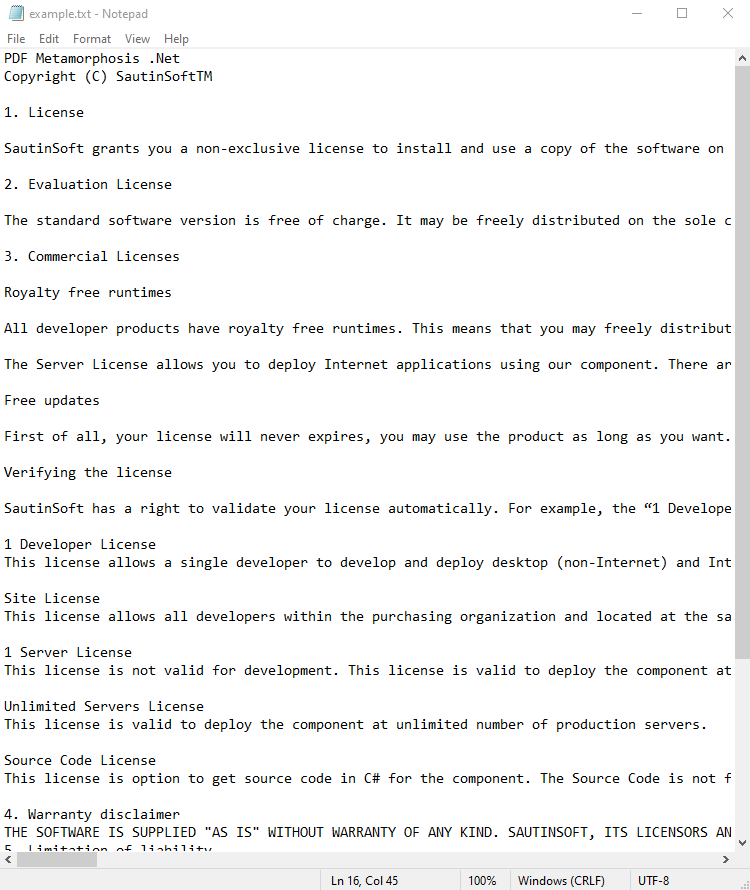
Input file:
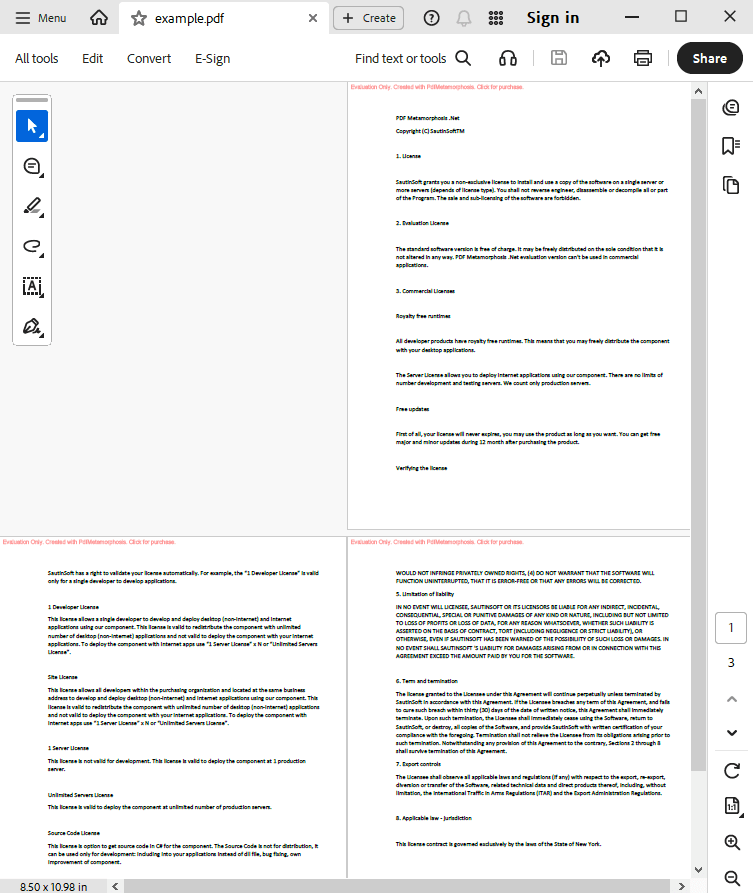
Output result:
Complete code
 GitHub
using System;
using System.IO;
using System.Collections;
namespace Sample
{
class Test
{
static void Main(string[] args)
{
// Before starting, we recommend to get a free key:
// https://sautinsoft.com/start-for-free/
// Apply the key here:
// SautinSoft.PdfMetamorphosis.SetLicense("...");
SautinSoft.PdfMetamorphosis p = new SautinSoft.PdfMetamorphosis();
if (p != null)
{
string textPath = @"..\..\..\example.txt";
string pdfPath = Path.ChangeExtension(textPath, ".pdf");
string textString = File.ReadAllText(textPath);
// 2. Convert Text to PDF in memory
byte[] pdfBytes = p.TextToPdfConvertStringToByte(textString);
if (pdfBytes != null)
{
//3. Save the PDF document to a file for a viewing purpose.
File.WriteAllBytes(pdfPath, pdfBytes);
System.Diagnostics.Process.Start(new System.Diagnostics.ProcessStartInfo(pdfPath) { UseShellExecute = true });
}
else
{
System.Console.WriteLine("An error occurred during converting Text to PDF!");
}
}
}
}
}
Imports System.IO

Namespace Sample
    Friend Class Test
        Shared Sub Main(ByVal args() As String)
			' Before starting, we recommend to get a free key:
            ' https://sautinsoft.com/start-for-free/

            ' Apply the key here:
			' SautinSoft.PdfMetamorphosis.SetLicense("...");


            Dim p As New SautinSoft.PdfMetamorphosis()

            If p IsNot Nothing Then
                Dim textPath As String = "..\..\..\example.txt"
                Dim pdfPath As String = Path.ChangeExtension(textPath, ".pdf")
                Dim textString As String = File.ReadAllText(textPath)

                ' 2. Convert Text to PDF in memory
                Dim pdfBytes() As Byte = p.TextToPdfConvertStringToByte(textString)

                If pdfBytes IsNot Nothing Then

                    '3. Save the PDF document to a file for a viewing purpose.
                    File.WriteAllBytes(pdfPath, pdfBytes)
                    System.Diagnostics.Process.Start(New System.Diagnostics.ProcessStartInfo(pdfPath) With {.UseShellExecute = True})
                Else
                    System.Console.WriteLine("An error occurred during converting Text to PDF!")
                End If
            End If
        End Sub
    End Class
End NamespaceIf you need a new code example or have a question: email us at support@sautinsoft.com or ask at Online Chat (right-bottom corner of this page).