Convert RTF to PDF in stream using C# and .NET
Document processing plays a key role in business applications today. There's often a need to convert files of various formats-for example, from RTF (Rich Text Format) to the popular and widely used PDF. Performing such conversions in streaming mode is especially important, as files are loaded or processed piecemeal, without the need to save intermediate steps to disk.
In this context, many developers find the PDF Metamorphosis .NET from SautinSoft SDK helpful — a powerful tool for converting documents of various formats. In this article, we'll take a detailed look at how to convert RTF to PDF in streaming mode using C# and .NET.
Converting RTF to PDF is a common task in document management, and streaming approaches are becoming increasingly popular. This is especially relevant for server-based solutions, where it's important not to block the main processing flow. It's a preferred solution for daily reports, printed forms, and documentation, as PDF offers a high level of compatibility, security, and ease of distribution.
RTF (Rich Text Format) is a document format developed by Microsoft for exchanging formatted text (fonts, colors, lists, tables, etc.). It is widely used in office applications due to its versatility.
Stream processing offers many advantages:
- Low memory consumption. No need to load the entire file into RAM; processing can be done by reading and writing it in chunks.
- Increased performance. Speeds up system operation by processing data as needed.
- Flexible integration. Easily implement asynchronous operations or work with network streams.
The basic idea is to use the `Stream` classes in C# (e.g., `MemoryStream,` `FileStream`) to:
- Pass an input data stream (RTF).
- Receive an output data stream (PDF).
- Process the conversion without intermediate files.
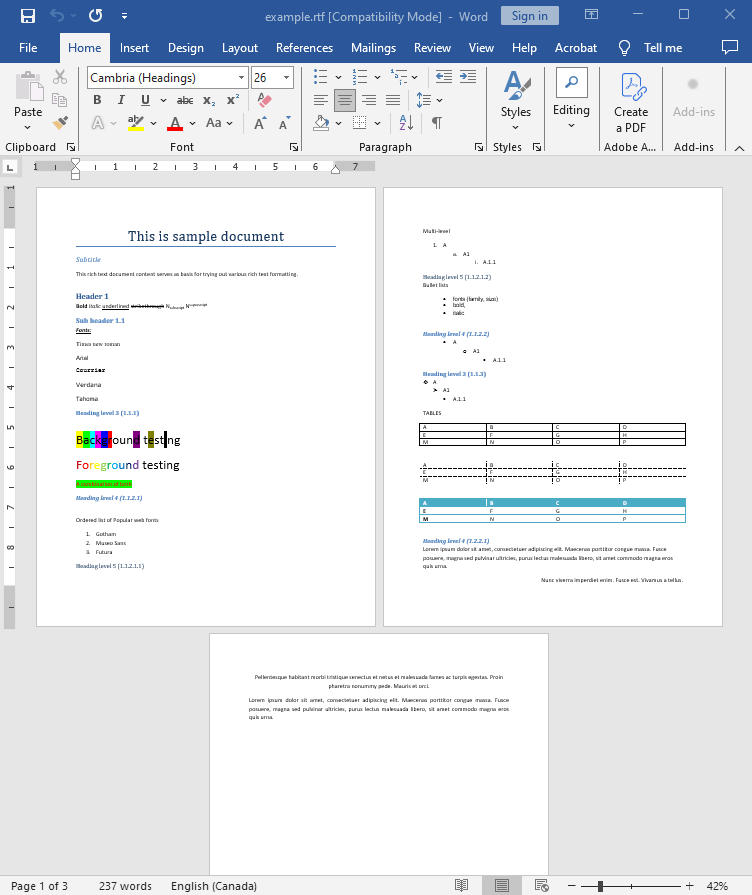
Input file:
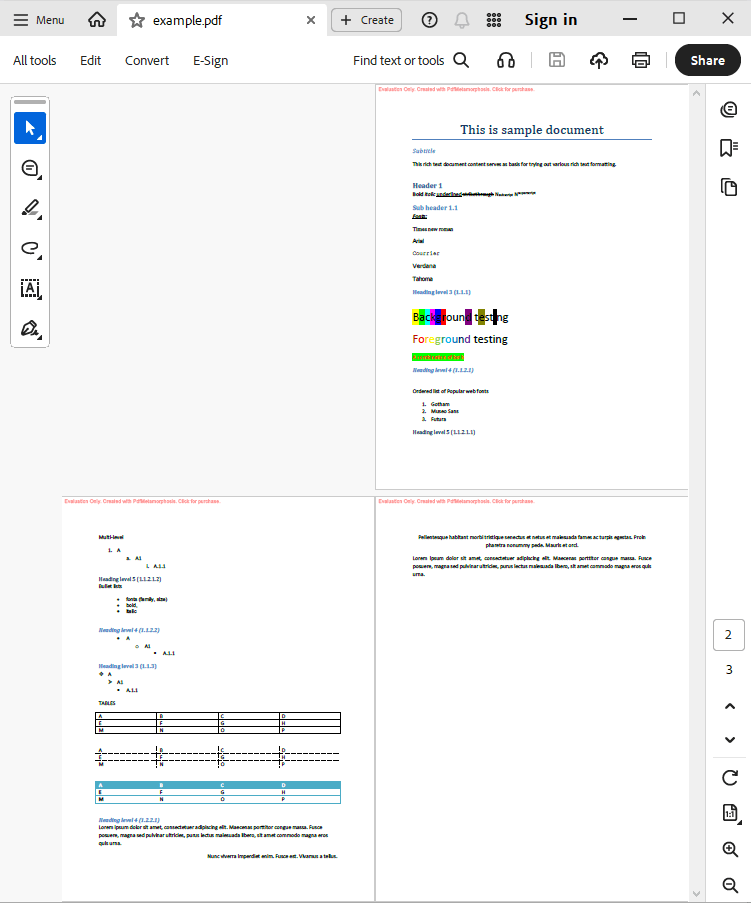
Output result:
Complete code
 GitHub
using System;
using System.IO;
using System.Collections;
namespace Sample
{
class Test
{
static void Main(string[] args)
{
// Before starting, we recommend to get a free key:
// https://sautinsoft.com/start-for-free/
// Apply the key here:
// SautinSoft.PdfMetamorphosis.SetLicense("...");
SautinSoft.PdfMetamorphosis p = new SautinSoft.PdfMetamorphosis();
if (p != null)
{
string rtfPath = @"..\..\..\example.rtf";
string pdfPath = Path.ChangeExtension(rtfPath, ".pdf");
MemoryStream rtf = new MemoryStream(File.ReadAllBytes(rtfPath));
// 3. Convert RTF to PDF in stream
Stream pdf = p.RtfToPdfConvertStream(rtf);
if (pdf != null)
{
pdf.Position = 0;
var ms = new MemoryStream();
pdf.CopyTo(ms);
ms.Position = 0;
// 3. Save the PDF document to a file for a viewing purpose.
File.WriteAllBytes(pdfPath, ms.ToArray());
System.Diagnostics.Process.Start(new System.Diagnostics.ProcessStartInfo(pdfPath) { UseShellExecute = true });
}
else
{
System.Console.WriteLine("Conversion failed!");
Console.ReadLine();
}
}
}
}
}Option Infer On
Imports System
Imports System.IO
Imports System.Collections
Namespace Sample
Friend Class Test
Shared Sub Main(ByVal args() As String)
' Before starting, we recommend to get a free key:
' https://sautinsoft.com/start-for-free/
' Apply the key here:
' SautinSoft.PdfMetamorphosis.SetLicense("...");
Dim p As New SautinSoft.PdfMetamorphosis()
If p IsNot Nothing Then
Dim rtfPath As String = "..\..\..\example.rtf"
Dim pdfPath As String = Path.ChangeExtension(rtfPath, ".pdf")
Dim rtf As New MemoryStream(File.ReadAllBytes(rtfPath))
' 3. Convert RTF to PDF in stream
Dim pdf As Stream = p.RtfToPdfConvertStream(rtf)
If pdf IsNot Nothing Then
pdf.Position = 0
Dim ms = New MemoryStream()
pdf.CopyTo(ms)
ms.Position = 0
' 3. Save the PDF document to a file for a viewing purpose.
File.WriteAllBytes(pdfPath, ms.ToArray())
System.Diagnostics.Process.Start(New System.Diagnostics.ProcessStartInfo(pdfPath) With {.UseShellExecute = True})
Else
System.Console.WriteLine("Conversion failed!")
Console.ReadLine()
End If
End If
End Sub
End Class
End Namespace
If you need a new code example or have a question: email us at support@sautinsoft.com or ask at Online Chat (right-bottom corner of this page).