Convert RTF file to PDF file in C# and .NET
Converting documents from one format to another is a common task in business application development, document automation, and content management systems. Particularly relevant is the need to convert RTF files to PDF—a standard and widely used format for document exchange and storage that provides consistent display across platforms.
In this article, we'll explore how to implement RTF to PDF conversion using the component PDF Metamorphosis .NET from SautinSoft library. We'll explore the key advantages of this approach, use cases, and when you can integrate this functionality into your projects.
Here are a few scenarios where this conversion is suitable:
- Document workflow automation. Third-party systems or internal processes require PDF for approvals or archiving.
- Report generation. Preparing documents with formatting for business presentations.
- Integration with CRM or other business systems. Automatic generation of PDF reports from RTF templates.
- Ensuring consistent display standards. PDF guarantees consistent display quality regardless of platform or device.
- Storage and archiving. RTF requests often come from external sources, while PDF provides more versatile and reliable storage.
Code usability:
- Process automation. Facilitates integration into business logic, scripts, backend, or desktop applications.
- Format support. All styles, tables, images, and document structure are preserved.
- Easy scalability. Bulk document conversion is possible, regardless of volume.
- Process customization. Additional parameters (e.g., quality, fonts, PDF properties).
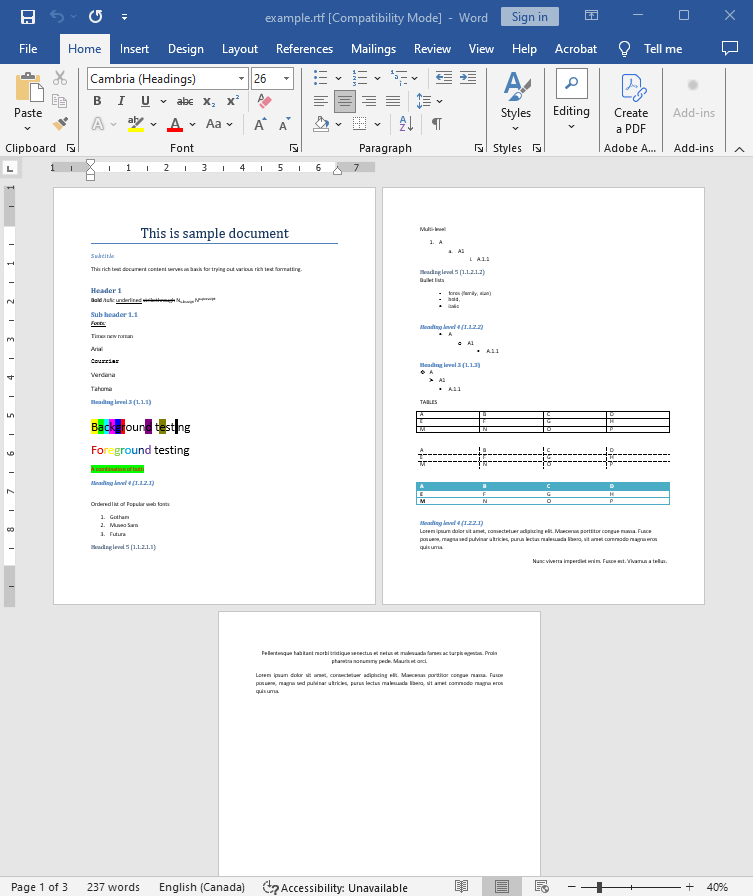
Input file:
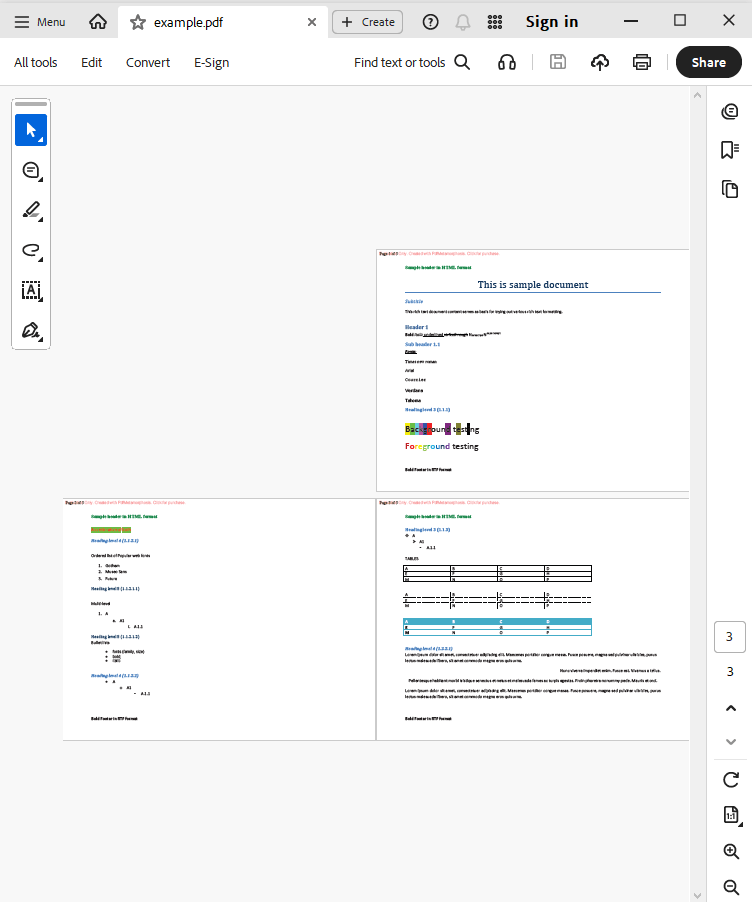
Output result:
Complete code
 GitHub
using System;
using System.IO;
using System.Collections;
namespace Sample
{
class Test
{
static void Main(string[] args)
{
// Before starting, we recommend to get a free key:
// https://sautinsoft.com/start-for-free/
// Apply the key here:
// SautinSoft.PdfMetamorphosis.SetLicense("...");
SautinSoft.PdfMetamorphosis p = new SautinSoft.PdfMetamorphosis();
// Specify some page options.
p.PageSettings.Orientation = SautinSoft.PdfMetamorphosis.PageSetting.Orientations.Landscape;
// Set page header in HTML format.
p.PageSettings.Header.FromString("<b style=\"color: green;\">Sample header in HTML format</b>", SautinSoft.PdfMetamorphosis.HeadersFooters.InputFormat.Html);
// Set page footer in RTF format.
p.PageSettings.Footer.FromString("{\\rtf1 \\b Bold Footer in RTF format}", SautinSoft.PdfMetamorphosis.HeadersFooters.InputFormat.Rtf);
// Set page numbers.
p.PageSettings.Numbering.Text = "Page {page} of {numpages}";
if (p != null)
{
string rtfPath = @"..\..\..\example.rtf";
string pdfPath = Path.ChangeExtension(rtfPath, ".pdf");
int i = p.RtfToPdfConvertFile(rtfPath, pdfPath);
if (i != 0)
{
System.Console.WriteLine("An error occurred during converting RTF to PDF!");
}
else
{
System.Diagnostics.Process.Start(new System.Diagnostics.ProcessStartInfo(pdfPath) { UseShellExecute = true });
}
}
}
}
}
Imports System
Imports System.IO
Imports System.Collections

Namespace Sample

	Friend Class Test

		Shared Sub Main(ByVal args() As String)
			' Before starting, we recommend to get a free key:
            ' https://sautinsoft.com/start-for-free/

            ' Apply the key here:
			' SautinSoft.PdfMetamorphosis.SetLicense("...");


			Dim p As New SautinSoft.PdfMetamorphosis()

			' Specify some page options.
			p.PageSettings.Orientation = SautinSoft.PdfMetamorphosis.PageSetting.Orientations.Landscape

			' Set page header in HTML format.
			p.PageSettings.Header.FromString("<b style=""color: green;"">Sample header in HTML format</b>", SautinSoft.PdfMetamorphosis.HeadersFooters.InputFormat.Html)

			' Set page footer in RTF format.
			p.PageSettings.Footer.FromString("{\rtf1 \b Bold Footer in RTF format}", SautinSoft.PdfMetamorphosis.HeadersFooters.InputFormat.Rtf)

			' Set page numbers.
			p.PageSettings.Numbering.Text = "Page {page} of {numpages}"

			If p IsNot Nothing Then
				Dim rtfPath As String = "..\..\..\example.rtf"
				Dim pdfPath As String = Path.ChangeExtension(rtfPath, ".pdf")

				Dim i As Integer = p.RtfToPdfConvertFile(rtfPath, pdfPath)

				If i <> 0 Then
					System.Console.WriteLine("An error occurred during converting RTF to PDF!")
				Else
					System.Diagnostics.Process.Start(New System.Diagnostics.ProcessStartInfo(pdfPath) With {.UseShellExecute = True})
				End If
			End If
		End Sub
	End Class
End Namespace
If you need a new code example or have a question: email us at support@sautinsoft.com or ask at Online Chat (right-bottom corner of this page).