How to add page header and footer in PDF using C# and .NET
Creating professional PDF documents often requires not only generating content but also formatting it with headers and footers. In this article, we'll take a detailed look at how to add headers and footers to a PDF file using the component PDF Metamorphosis .NET from SautinSoft SDK — a powerful tool for working with PDFs in C# and .NET.
Adding headers and footers is a standard practice for creating professional documents:
- Improve document readability: Navigation elements help readers quickly navigate.
- Branding: Headers and footers can be used to display a logo or contact information.
- Automate formatting: Using code, you can dynamically insert page numbers, dates, and section titles.
- Versatility: These elements are useful in reports, commercial proposals, technical documentation, and more.
The advantage of automatically adding elements: it reduces the likelihood of errors associated with manual editing, increasing the speed of document preparation.
Automated addition of headers and footers is a standard solution for generating professional documentation, reports, forms, and contracts.
Therefore, such methods are used in:
- Accounting and reporting.
- Contract and agreement generation.
- Creation of presentation and marketing materials.
- Educational and scientific publications.
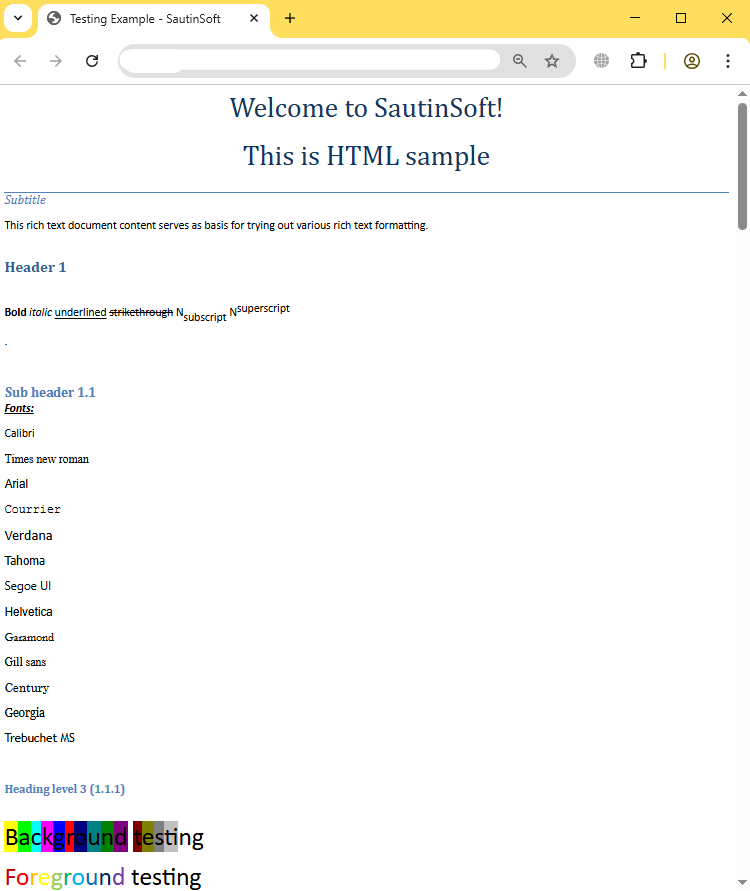
Input file:
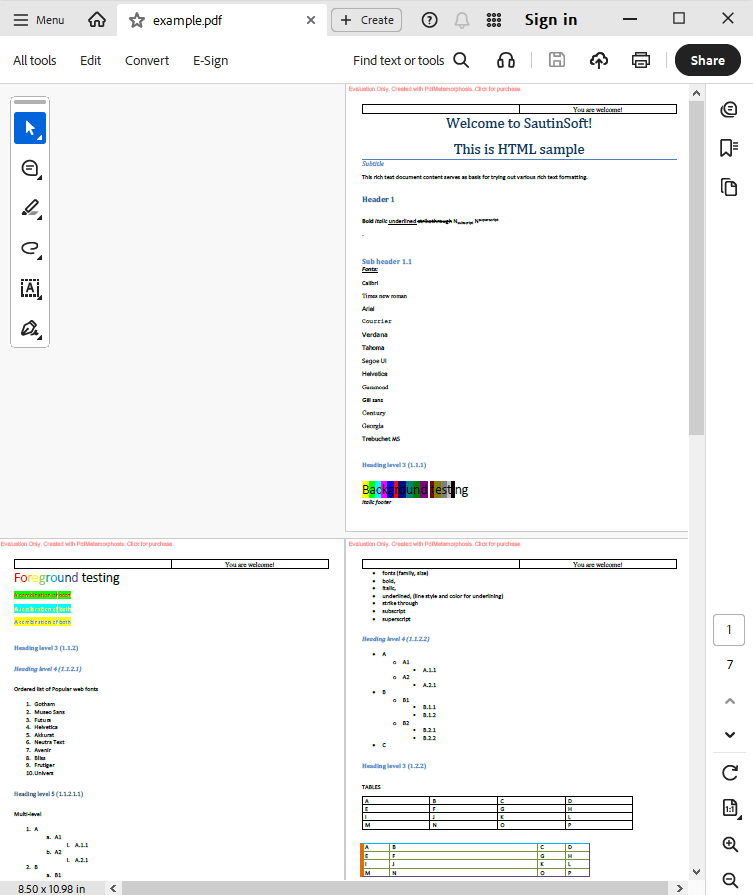
Output result:
Complete code
 GitHub
using System.IO;
namespace Sample
{
class Test
{
static void Main(string[] args)
{
// Before starting, we recommend to get a free key:
// https://sautinsoft.com/start-for-free/
// Apply the key here:
// SautinSoft.PdfMetamorphosis.SetLicense("...");
//How to add page header and footer
SautinSoft.PdfMetamorphosis p = new SautinSoft.PdfMetamorphosis();
//Let's add page header in HTML format
string headerInHtml = "<table width=\"100%\" border=\"0\" style=\"border-collapse: collapse\"><tr><td style=\"border: 1pt solid black\" ></td><td width=\"50%\" align=\"center\" style=\"border: 1pt solid black\">You are welcome!</td></tr></table>";
p.PageSettings.Header.FromString(headerInHtml, SautinSoft.PdfMetamorphosis.HeadersFooters.InputFormat.Html);
string footerInRtf = @"{\rtf1\i Italic footer }";
p.PageSettings.Footer.FromString(footerInRtf, SautinSoft.PdfMetamorphosis.HeadersFooters.InputFormat.Rtf);
if (p != null)
{
string inputFile = @"..\..\..\example.htm";
string outputFile = Path.ChangeExtension(inputFile, ".pdf");
int result = p.HtmlToPdfConvertFile(inputFile, outputFile);
if (result == 0)
{
System.Console.WriteLine("Converted successfully!");
System.Diagnostics.Process.Start(new System.Diagnostics.ProcessStartInfo(outputFile) { UseShellExecute = true });
}
else
{
System.Console.WriteLine("Converting Error!");
}
}
}
}
}
Imports System.IO

Module sample

    Sub Main()

        'How to add page header and footer
        ' Before starting, we recommend to get a free key:
        ' https://sautinsoft.com/start-for-free/

        ' Apply the key here:
        ' SautinSoft.PdfMetamorphosis.SetLicense("...");

        Dim p As SautinSoft.PdfMetamorphosis = New SautinSoft.PdfMetamorphosis()
        Dim headerInHtml As String = "<table width=""100%"" border=""0"" style=""border-collapse: collapse""><tr><td style=""border: 1pt solid black"" ></td><td width=""50%"" align=""center"" style=""border: 1pt solid black"">You are welcome!</td></tr></table>"
        p.PageSettings.Header.FromString(headerInHtml, SautinSoft.PdfMetamorphosis.HeadersFooters.InputFormat.Html)
        Dim footerInRtf As String = "{\rtf1\i Italic footer }"
        p.PageSettings.Footer.FromString(footerInRtf, SautinSoft.PdfMetamorphosis.HeadersFooters.InputFormat.Rtf)

        If p IsNot Nothing Then
            Dim inputFile As String = "..\..\..\example.htm"
            Dim outputFile As String = Path.ChangeExtension(inputFile, ".pdf")
            Dim result As Integer = p.HtmlToPdfConvertFile(inputFile, outputFile)

            If result = 0 Then
                System.Console.WriteLine("Converted successfully!")
                System.Diagnostics.Process.Start(New System.Diagnostics.ProcessStartInfo(outputFile) With {
                        .UseShellExecute = True
                    })
            Else
                System.Console.WriteLine("Converting Error!")
            End If
        End If
    End Sub
End ModuleIf you need a new code example or have a question: email us at support@sautinsoft.com or ask at Online Chat (right-bottom corner of this page).