Convert DOCX to PDF in stream using C# and .NET
In today's world, document processing and transformation plays a key role in automating business processes, web applications, and content management systems. One common task is converting DOCX documents to PDF. This is especially relevant when developing server-side applications or systems where streaming data processing is essential without the need to save intermediate files.
In this context, the PDF Metamorphosis .NET from SautinSoft library provides a powerful tool for such tasks, enabling document conversion directly in streams, significantly increasing the efficiency and flexibility of applications.
Advantages of stream processing:
- Flexibility. Files received over the network or from a database can be processed without writing to disk.
- Higher performance. Reading and writing temporary files is eliminated.
- Security. Data leakage risks are minimized since files are not stored locally.
- Integration. Easily integrated into REST APIs, web services, or real-time data processing systems.
This code is suitable for various scenarios:
- Services that receive documentation or requests in DOCX format and require a PDF version.
- Cloud platforms that process documents on the fly.
- Web applications with PDF preview or download functions.
- Document workflow automation and report generation.
Features and interesting aspects to consider when using this method:
- Stream processing avoids the file system. All operations are performed with Stream, making the code as flexible and fast as possible. Files retrieved from the network, databases, or other sources can be processed.
- High speed and low resource consumption. The library can handle large documents without requiring much memory, especially with proper streaming implementation.
- Support for various formats. In addition to DOCX, Metamorphosis supports many input formats—HTML, RTF, XML, and others—which expands its application range.
- Use in a Multithreaded Environment. The library operates correctly in multithreaded environments, which is important for server-side APIs.
- The Need for Proper Error Handling. When working with threads, it's important to consider error handling to avoid memory leaks or invalid data.
- Licensing and Cost This is a commercial product, so it's important to consider licensing considerations when using it in commercial projects.
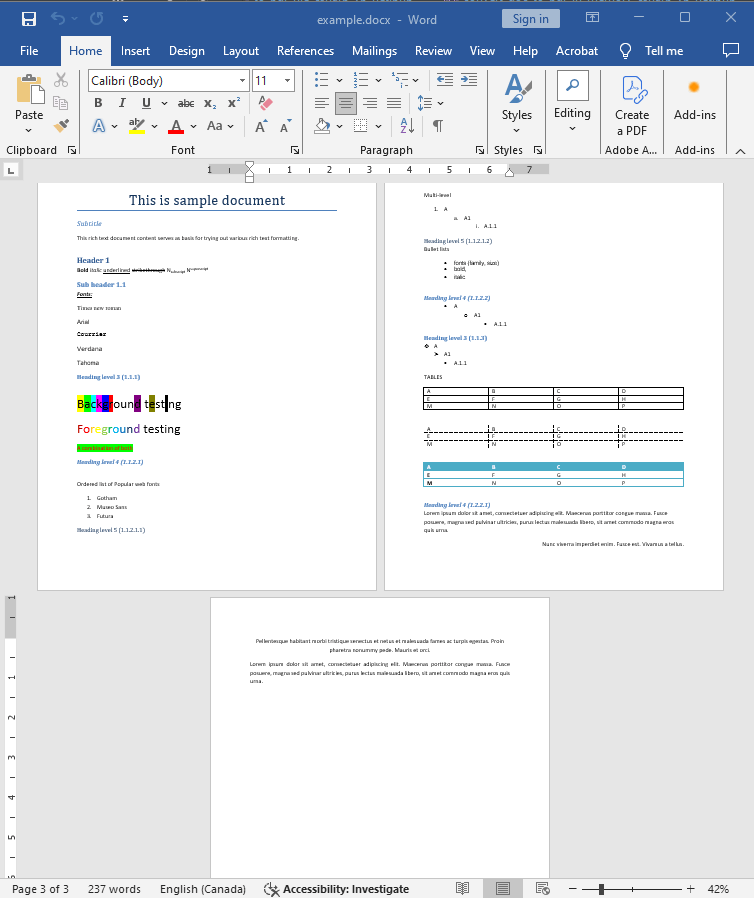
Input file:
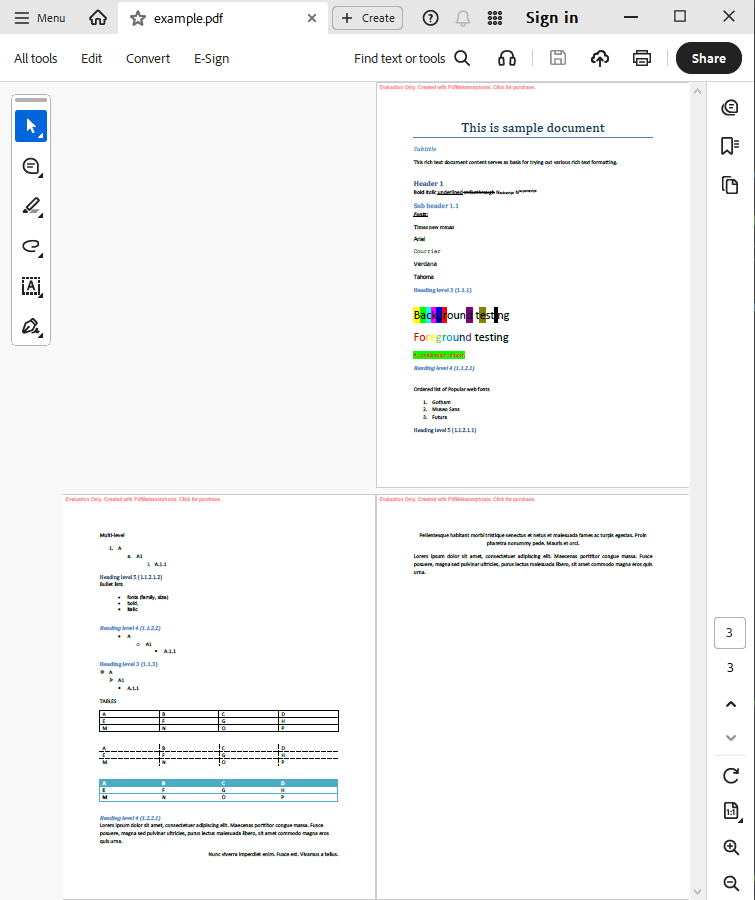
Output result:
Complete code
 GitHub
using System;
using System.IO;
using System.Collections;
namespace Sample
{
class Test
{
static void Main(string[] args)
{
// Before starting, we recommend to get a free key:
// https://sautinsoft.com/start-for-free/
// Apply the key here:
// SautinSoft.PdfMetamorphosis.SetLicense("...");
SautinSoft.PdfMetamorphosis p = new SautinSoft.PdfMetamorphosis();
if (p != null)
{
string docxPath = @"..\..\..\example.docx";
string pdfPath = Path.ChangeExtension(docxPath, ".pdf");
MemoryStream docx = new MemoryStream(File.ReadAllBytes(docxPath));
// 3. Convert DOCX to PDF in stream
Stream pdf = p.DocxToPdfConvertStream(docx);
if (pdf != null)
{
pdf.Position = 0;
var ms = new MemoryStream();
pdf.CopyTo(ms);
ms.Position = 0;
// 3. Save the PDF document to a file for a viewing purpose.
File.WriteAllBytes(pdfPath, ms.ToArray());
System.Diagnostics.Process.Start(new System.Diagnostics.ProcessStartInfo(pdfPath) { UseShellExecute = true });
}
else
{
System.Console.WriteLine("Conversion failed!");
Console.ReadLine();
}
}
}
}
}Option Infer On
Imports System
Imports System.IO
Imports System.Collections
Namespace Sample
Friend Class Test
Shared Sub Main(ByVal args() As String)
' Before starting, we recommend to get a free key:
' https://sautinsoft.com/start-for-free/
' Apply the key here:
' SautinSoft.PdfMetamorphosis.SetLicense("...");
Dim p As New SautinSoft.PdfMetamorphosis()
If p IsNot Nothing Then
Dim docxPath As String = "..\..\..\example.docx"
Dim pdfPath As String = Path.ChangeExtension(docxPath, ".pdf")
Dim docx As New MemoryStream(File.ReadAllBytes(docxPath))
' 3. Convert DOCX to PDF in stream
Dim pdf As Stream = p.DocxToPdfConvertStream(docx)
If pdf IsNot Nothing Then
pdf.Position = 0
Dim ms = New MemoryStream()
pdf.CopyTo(ms)
ms.Position = 0
' 3. Save the PDF document to a file for a viewing purpose.
File.WriteAllBytes(pdfPath, ms.ToArray())
System.Diagnostics.Process.Start(New System.Diagnostics.ProcessStartInfo(pdfPath) With {.UseShellExecute = True})
Else
System.Console.WriteLine("Conversion failed!")
Console.ReadLine()
End If
End If
End Sub
End Class
End Namespace
If you need a new code example or have a question: email us at support@sautinsoft.com or ask at Online Chat (right-bottom corner of this page).