How to set single font in PDF using C# and .NET
Working with PDF documents in .NET applications is becoming increasingly popular. One popular tool for this purpose is the component PDF Metamorphosis .NET from SautinSoft API — a powerful and flexible component that allows you to convert, edit, and create PDF files programmatically.
One of the most common tasks in automated PDF processing is the need to set a single font for the entire document. This is important for consistent design, eliminating compatibility issues, and improving the readability of the resulting file.
Setting a single font is the process of programmatically specifying a font that will be used to display all text elements in a PDF document, regardless of the original text sources or default settings.
Advantages of using this code:
- Ensures a consistent visual style for the document.
- Improves readability through appropriate font selection.
- Unify the design of reports, forms, and emails automatically.
- Provides support for languages and characters that use specialized fonts.
An interesting aspect: automatic insertion of uniform fonts also helps when generating multilingual documents, ensuring support for all necessary characters if the correct font is selected.
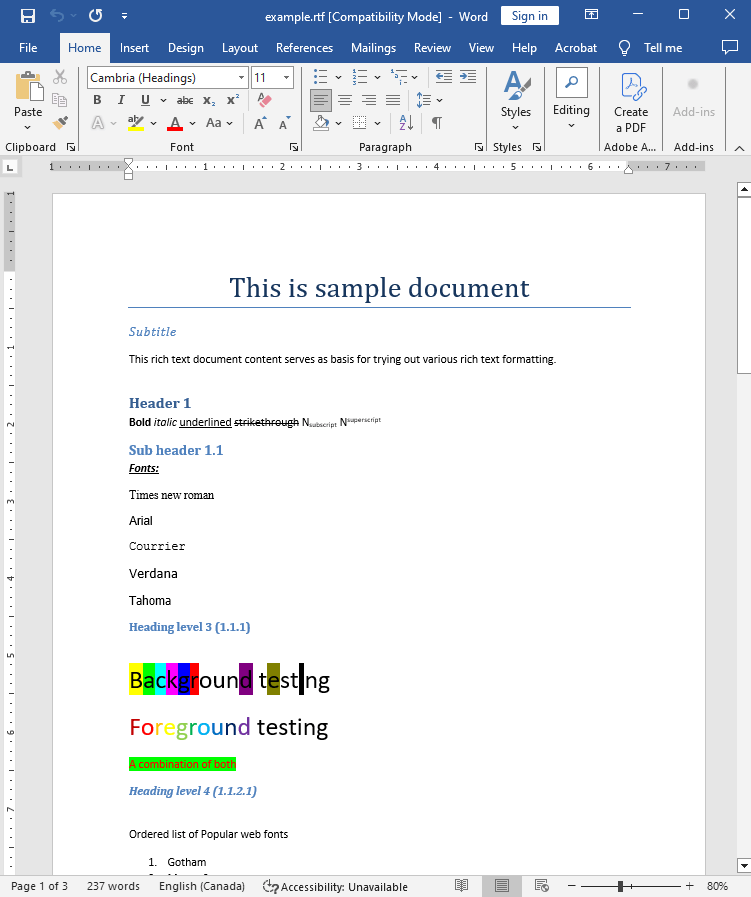
Input file:
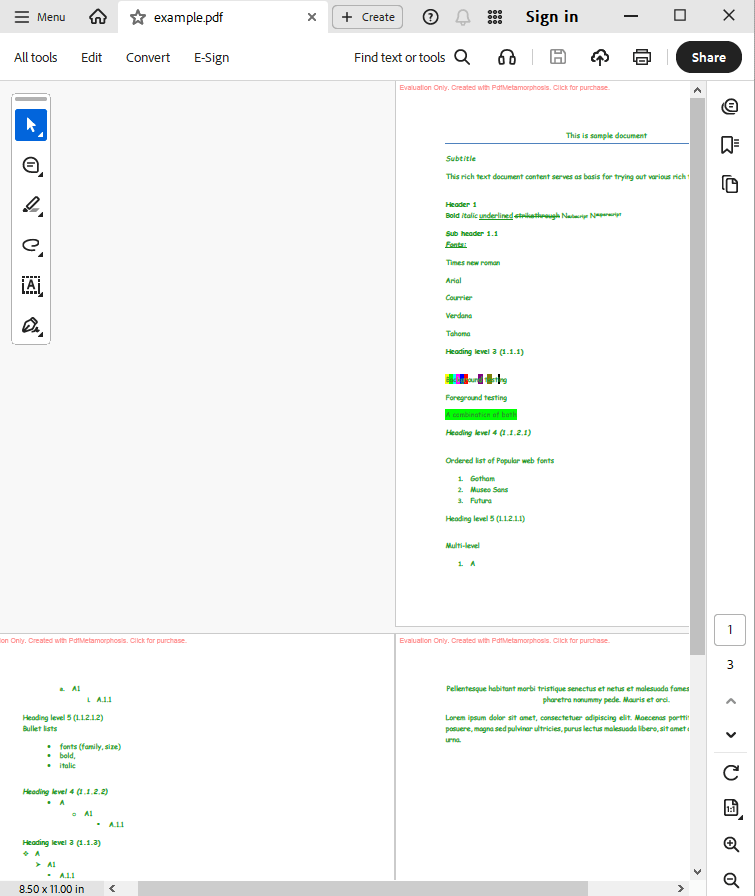
Output result:
Complete code
 GitHub
using System;
using System.IO;
using System.Collections;
namespace Sample
{
class Test
{
static void Main(string[] args)
{
// Before starting, we recommend to get a free key:
// https://sautinsoft.com/start-for-free/
// Apply the key here:
// SautinSoft.PdfMetamorphosis.SetLicense("...");
// How to set a single font for the whole PDF document.
SautinSoft.PdfMetamorphosis p = new SautinSoft.PdfMetamorphosis();
// Let's make that the all text in PDF became in 'Comic Sans MS' font
p.TextSettings.FontFace.Custom("Comic Sans MS");
// Set also a single font size 10
p.TextSettings.FontSize = 10;
// Set also single text color
p.TextSettings.FontColor = System.Drawing.Color.FromArgb(33, 150, 33);
if (p != null)
{
string rtfPath = @"..\..\..\example.rtf";
string pdfPath = Path.ChangeExtension(rtfPath, ".pdf");
int i = p.RtfToPdfConvertFile(rtfPath,pdfPath);
if (i !=0)
{
System.Console.WriteLine("An error occurred during converting RTF to PDF!");
}
else
{
System.Diagnostics.Process.Start(new System.Diagnostics.ProcessStartInfo(pdfPath) { UseShellExecute = true });
}
}
}
}
}
Namespace Sample
    Friend Class Test
        Shared Sub Main(ByVal args() As String)

            ' How to set a single font for the whole PDF document.
			' Before starting, we recommend to get a free key:
            ' https://sautinsoft.com/start-for-free/

            ' Apply the key here:
			' SautinSoft.PdfMetamorphosis.SetLicense("...");


            Dim p As New SautinSoft.PdfMetamorphosis()

            ' Let's make that the all text in PDF became in 'Comic Sans MS' font
            p.TextSettings.FontFace.Custom("Comic Sans MS")

            ' Set also a single font size 10
            p.TextSettings.FontSize = 10

            ' Set also single text color
            p.TextSettings.FontColor = System.Drawing.Color.FromArgb(33, 150, 33)

            If p IsNot Nothing Then
                Dim rtfPath As String = "..\..\..\example.rtf"
                Dim pdfPath As String = "..\..\..\test.pdf"

                Dim i As Integer = p.RtfToPdfConvertFile(rtfPath, pdfPath)

                If i <> 0 Then
                    System.Console.WriteLine("An error occurred during converting RTF to PDF!")
                Else
                    System.Diagnostics.Process.Start(New System.Diagnostics.ProcessStartInfo(pdfPath) With {.UseShellExecute = True})
                End If
            End If
        End Sub
    End Class
End NamespaceIf you need a new code example or have a question: email us at support@sautinsoft.com or ask at Online Chat (right-bottom corner of this page).