Convert DOCX to PDF in memory using C# and .NET
In modern development, the need for automated document generation and processing often arises. One common task is converting Microsoft Word documents (DOCX) to PDF, which ensures universal compatibility and high display quality. It's especially valuable when the conversion occurs "in memory" - without hard-saving temporary files to disk-this increases the speed and security of the process. In this article, we'll take a detailed look at how to implement in-memory DOCX to PDF conversion in C# and .NET using the component PDF Metamorphosis .NET from SautinSoft library.
The term "in-memory conversion" refers to processing documents without storing files on disk. This is achieved using `Streams`, which allows:
- To speed up the process, as file system operations are slowed by I/O.
- To improve security by eliminating the need to store temporary files on disk.
- To ensure cleaner resource management, avoiding resource leaks and errors.
A practical example is a web application that receives a DOCX document via an API, immediately converts it to PDF, and returns it to the user without creating temporary files on the server.
Let's consider an example where you have an input document stream named `Stream` in the DOCX format and want to output a PDF to another stream.
- `Stream` objects are used to read and write data.
- Conversion is performed using the `Convert` method, which accepts the input stream, source document type, output stream, and target format.
- As a result, the PDF is saved directly to the `outputPdfStream` stream, without storing temporary files.
Overview of interesting aspects and nuances of use.
- Why is it important to avoid storing temporary files? When working with large data streams or in security-critical scenarios (such as processing confidential information), storing files on disk can be a threat. The in-Memory approach helps minimize risks, increase speed, and reduce file management costs.
- Compatibility and Quality. PDF Metamorphosis ensures that the generated PDF preserves all DOCX formatting, images, and fonts-especially important for official documents, presentations, and reports.
- How often is this example used? In real-world business solutions, similar conversions are found in electronic document management systems, automated reporting services, online document editing platforms, and API services for processing documents in the cloud.
What other applications can such code be used for?
- Integration into web services where documents are processed in real time.
- Automation of document flow within corporate systems.
- Creation of conceptual KPIs where it is necessary to quickly generate PDF reports from form documents.
- Processing files from cloud storage, without the need to download and save them to disk.
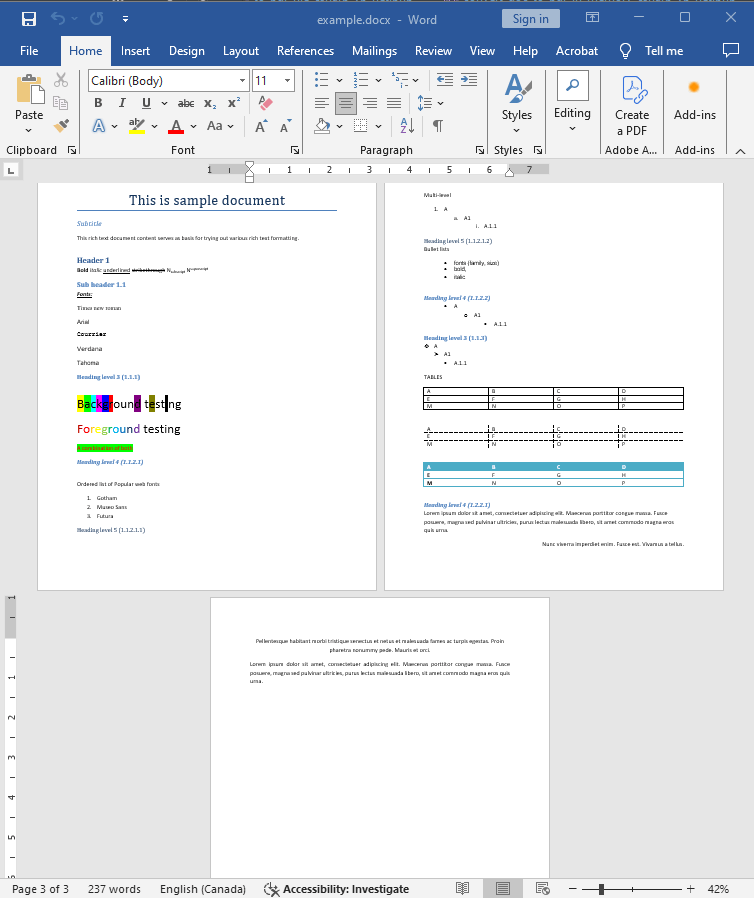
Input file:
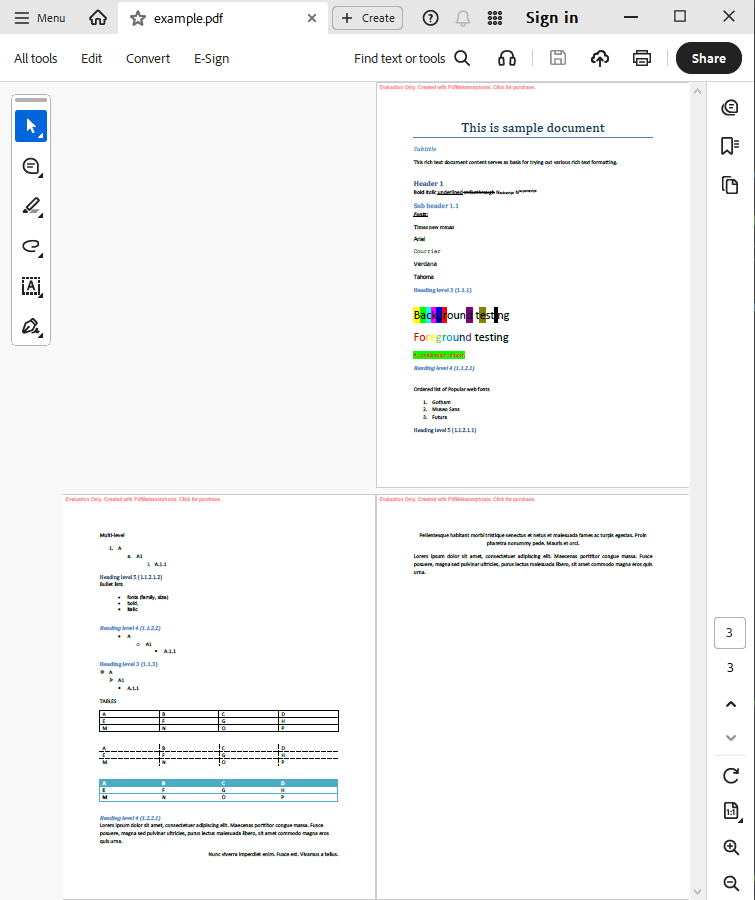
Output result:
Complete code
 GitHub
using System;
using System.IO;
using System.Collections;
namespace Sample
{
class Test
{
static void Main(string[] args)
{
// Before starting, we recommend to get a free key:
// https://sautinsoft.com/start-for-free/
// Apply the key here:
// SautinSoft.PdfMetamorphosis.SetLicense("...");
SautinSoft.PdfMetamorphosis p = new SautinSoft.PdfMetamorphosis();
if (p != null)
{
string docxPath = @"..\..\..\example.docx";
string pdfPath = Path.ChangeExtension(docxPath, ".pdf");
byte[] docx = File.ReadAllBytes(docxPath);
// 2. Convert DOCX to PDF in memory
byte[] pdf = p.DocxToPdfConvertByte(docx);
if (pdf != null)
{
// 3. Save the PDF document to a file for a viewing purpose.
File.WriteAllBytes(pdfPath, pdf);
System.Diagnostics.Process.Start(new System.Diagnostics.ProcessStartInfo(pdfPath) { UseShellExecute = true });
}
else
{
System.Console.WriteLine("Conversion failed!");
Console.ReadLine();
}
}
}
}
}
Imports System
Imports System.IO

Namespace Sample
    Friend Class Test

        Shared Sub Main(ByVal args() As String)
			' Before starting, we recommend to get a free key:
            ' https://sautinsoft.com/start-for-free/

            ' Apply the key here:
			' SautinSoft.PdfMetamorphosis.SetLicense("...");


            Dim p As New SautinSoft.PdfMetamorphosis()

            If p IsNot Nothing Then
                Dim docxPath As String = "..\..\..\example.docx"
                Dim pdfPath As String = Path.ChangeExtension(docxPath, ".pdf")
                Dim docx() As Byte = File.ReadAllBytes(docxPath)

                ' 2. Convert DOCX to PDF in memory
                Dim pdf() As Byte = p.DocxToPdfConvertByte(docx)

                If pdf IsNot Nothing Then
                    ' 3. Save the PDF document to a file for a viewing purpose.
                    File.WriteAllBytes(pdfPath, pdf)
					System.Diagnostics.Process.Start(New System.Diagnostics.ProcessStartInfo(pdfPath) With {.UseShellExecute = True})
                Else
                    System.Console.WriteLine("Conversion failed!")
                    Console.ReadLine()
                End If
            End If
        End Sub
    End Class
End NamespaceIf you need a new code example or have a question: email us at support@sautinsoft.com or ask at Online Chat (right-bottom corner of this page) or use the Form below: