Current version of PDF Focus. Net in C# and .NET
In today's world, where business, education, and technology are constantly evolving, working with PDF files has become an integral part of developers' daily tasks. PDF Focus .NET from SautinSoft SDK, a powerful library that allows for quick and easy PDF operations, such as conversion, text extraction, conversion to other formats, and much more, is becoming a popular solution for efficient document processing in the .NET environment.
The latest version of PDF Focus .NET can be found here, where you can view updates to this component.
This code solves the following tasks:
- Document workflow automation – converting incoming PDFs into an editable format for processing and storage.
- Creation of electronic archiving systems – automatic text highlighting, indexing, and categorization.
- Integration into content management systems – automatic document upload, conversion, and publishing.
- Educational platforms – extracting text from educational materials and preparing them for further processing.
For example, a law firm using this library can automate the conversion of court PDF documents into Word documents for quick editing, eliminating manual data entry.
The library is widely used in various sectors:
- Banking – for processing reports and forms.
- Educational institutions – for the automatic extraction of educational materials.
- Small businesses – for document flow automation.
- Government agencies – for working with large volumes of PDF documents.
Interesting aspects and usage tips:
- Starting with the latest versions, the library supports and processes password-protected PDF files (with the correct credentials). This expands the capabilities of automatic processing for documents with restrictions.
- For processing very large PDFs, it is recommended to use asynchronous programming and memory optimization, which significantly improves speed and stability.
- To preserve the original appearance of the document as much as possible, use additional method parameters, managing quality, fonts, and images.
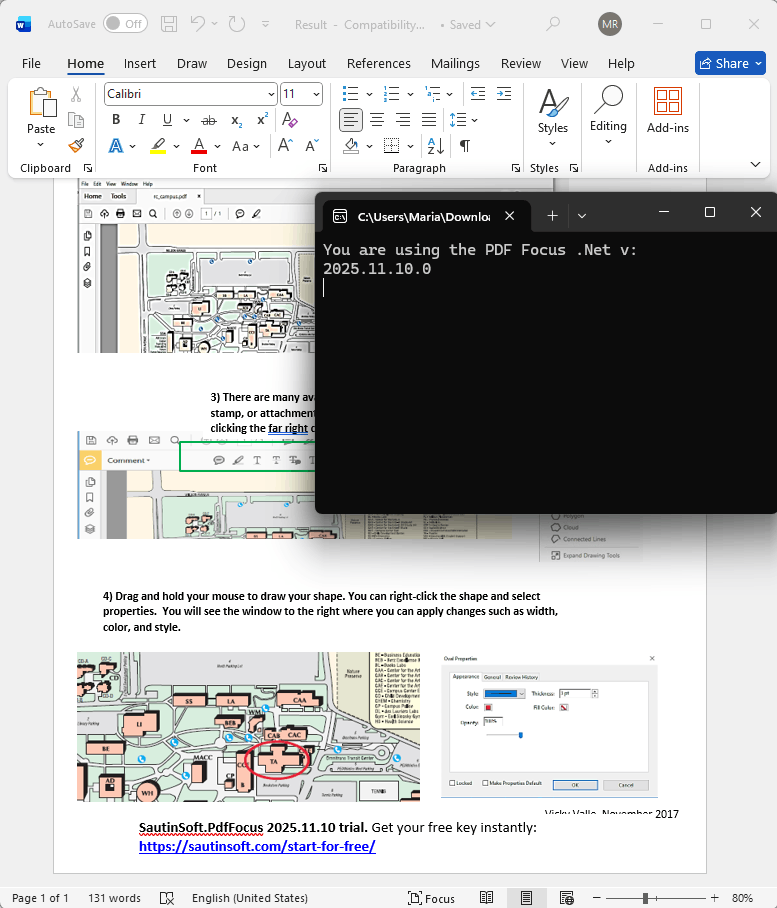
Output result:
Complete code
 GitHub
using System;
using System.IO;
namespace Sample
{
class Sample
{
static void Main(string[] args)
{
// Before starting, we recommend to get a free key:
// https://sautinsoft.com/start-for-free/
// Apply the key here:
// SautinSoft.PdfFocus.SetLicense("...");
string pdfFile = Path.GetFullPath(@"..\..\..\text and graphics.pdf");
string wordFile = "Result.docx";
//Convert PDF file to Text file
SautinSoft.PdfFocus f = new SautinSoft.PdfFocus();
f.OpenPdf(pdfFile);
if (f.PageCount > 0)
{
int result = f.ToWord(wordFile);
//Show Text document
if (result == 0)
{
Console.WriteLine("You are using the PDF Focus .Net v:");
Console.WriteLine(f.Version);
Console.ReadKey();
}
}
}
}
}
Imports System
Imports System.IO

Namespace Sample
	Friend Class Sample
		Shared Sub Main(ByVal args() As String)
			' Before starting, we recommend to get a free key:
			' https://sautinsoft.com/start-for-free/

			' Apply the key here
			' SautinSoft.PdfFocus.SetLicense("...");

			Dim pdfFile As String = Path.GetFullPath("..\..\..\text and graphics.pdf")
			Dim wordFile As String = "Result.docx"

			'Convert PDF file to Text file
			Dim f As New SautinSoft.PdfFocus()

			f.OpenPdf(pdfFile)

			If f.PageCount > 0 Then
				Dim result As Integer = f.ToWord(wordFile)

				'Show Text document
				If result = 0 Then
					Console.WriteLine("You are using the PDF Focus .Net v:")
					Console.WriteLine(f.Version)
					Console.ReadKey()
				End If
			End If
		End Sub
	End Class
End NamespaceIf you need a new code example or have a question: email us at support@sautinsoft.com or ask at Online Chat (right-bottom corner of this page).