Release Notes
2026.10 - October, 2026
We are pleased to officially introduce the new version of our product, PDF Vision .Net 2026.10.
Let’s take a closer look at what has been fixed or improved and why it is worth upgrading:
1. New ZUGFeRD and Factur-X APIs and improvements for your next integration.
Establish comprehensive ZUGFeRD and Factur-X electronic invoicing workflows utilizing a unified API solution. Transform structured XML into a
professional invoice PDF, maintain an existing branded PDF when its data aligns with the invoice information, regenerate it when discrepancies are identified,
and perform independent validation of the completed hybrid invoice.

Key Advantages of Create ZUGFeRD PDF API:
- Produce complete ZUGFeRD or Factur-X hybrid invoices derived from CII XML, encompassing a visual PDF representation, embedded XML attachment, mandatory metadata, and PDF/A-3 packaging structure.
- Integrate an existing invoice PDF with XML data and identify specific inconsistencies prior to finalizing the hybrid invoice for distribution, retention, or systematic processing.
- Reconstruct the visual invoice from authoritative XML whenever supplied PDF content contradicts the XML or cannot be reliably validated through verification procedures.
- Examine existing ZUGFeRD and Factur-X PDFs without alteration, assessing XML business regulations, PDF/A-3 compliance, attachment correlations, metadata integrity, and package composition.
- Accommodate MINIMUM, BASIC WL, BASIC, and EN 16931 profiles for ZUGFeRD 2.5.2 and Factur-X 1.09.2, facilitating adherence to contemporary German and French electronic invoicing mandates.
- Personalize XML-derived invoices through logos, standard and emphasized typefaces, language selection, regional conventions, currency representation, color schemes, decimal places, and supplementary footer content.
- Submit invoice documents directly or leverage SautinSoft resource identifiers from preceding operations to establish scalable, completely automated electronic invoicing workflows of any magnitude.
2. We’ve enhanced the PDF Merging and Splitting engine.
Comprehensive Guide to PDF File Splitting in C#: Essential Techniques for .NET Development Professionals Are you seeking to divide PDF files within C#?

Whether you are managing extensive documentation, streamlining document processing systems, or developing sophisticated business applications, the ability to partition PDF files represents a fundamental requirement for numerous .NET professionals. This comprehensive guide presents detailed methodologies for dividing PDF files in C#, encompassing not merely foundational concepts, but rather the complete spectrum of techniques required for practical implementation, ranging from individual page extraction to intelligent content-based partitioning. All demonstrations throughout this guide utilize SautinSoft, recognized as the most accessible and production-proven .NET PDF library available for professional development environments.
The necessity of dividing PDF documents in C# extends beyond simple document partitioning. It represents a mechanism for introducing operational adaptability. You may require the ability to furnish a client with only the pertinent section of a comprehensive proposal. Alternatively, your operational procedures may necessitate the independent archival of each invoice as a discrete document. Within regulated sectors, the practice of fragmenting substantial reports into smaller, more manageable segments is standard procedure for ensuring regulatory compliance, facilitating distribution, and supporting audit requirements.
SautinSoft streamlines this process, delivering dependable and expeditious functionality. The following examination addresses practical scenarios you are likely to encounter, accompanied by detailed procedural guidance for implementation in C#.
What Is the Process for Extracting Discrete Pages from a PDF Document in C#?
To partition a PDF document into individual single-page files utilizing C#, one may implement an iterative process that traverses all pages and exports each
page as an independent PDF file. This approach proves particularly advantageous for large-scale processing operations or systematic automation frameworks.
2026.9 - September, 2026
This is the biggest update in a few months (since July, 2026). We'll describe in more detail what's been fixed/improved and why you should update:
1. New support for EMF/WMF image formats in SautinSoft components.An EMF image is a 32-bit vector graphic file format created by Microsoft, known as an Enhanced Metafile, that stores drawing commands to render images scaled to any size without losing quality.

Key Features of EMF Files:
- Vector and Raster Data: Stores shapes, lines, text, and sometimes embedded bitmap data.
- Device Independence: Renders correctly on any output device, like a monitor or printer, regardless of resolution.
- Windows GDI Basis: Uses Windows Graphical Device Interface commands to recreate the image.
- Upgrade from WMF: Serves as the modern 32-bit successor to the older 16-bit Windows Metafile (WMF) format.
An Enhanced Metafile (EMF) file structure consists of a sequential list of variable-length records sandwiched between a mandatory header at the beginning and an end-of-file record at the finish.
Core Components:
- EMR_HEADER Record: Always starts the file. It holds metadata like file size, dimensions, version, the creator device's resolution, and a count of all drawing records.
- EMF Records: The middle section contains zero or more drawing records. These are GDI (Graphics Device Interface) function calls like lines, curves, shapes, and text styling that command how to render the vector image. Extensions can also inject pixel formats or OpenGL commands.
- EMF+ Records (Optional): Modern EMF files can embed GDI+ commands inside standard EMF records via an [MS-EMFPLUS] structure to allow advanced features like partial transparency.
- EMR_EOF Record: Always marks the end of the file, optionally containing a palette buffer.
Common Uses:
- Microsoft Office: Acts as a native format for storing clip art and simple vector graphics in Word, Excel, and PowerPoint.
- Printing Spools: Used by Windows to cache print jobs as vector instructions before sending them to a printer.
SautinSoft supports the next WMF Versions and Variants:
- Original WMF (16-bit): Introduced by Microsoft with Windows 3.0 in 1990. It stores drawing commands as a 16-bit list to reproduce vector and raster graphics across applications via the Windows Clipboard or MS Office clip art.
- Placeable Metafile (APM): A non-standard header variant added to older WMF files to ensure correct scaling, positioning, and device-independence when moving 16-bit graphics between different applications.
- Enhanced Metafile (EMF) (32-bit): Released later by Microsoft as a modern upgrade to WMF. It converts 16-bit arguments into 32-bit values, adds new function codes, improves device independence, and acts as a spool file format for printer drivers.
- EMF+: An extension of EMF that records graphic commands using GDI+ drawing application programming interfaces (APIs), supporting more complex shapes and smoothing options.
- WMZ / EMZ: Compressed versions of WMF and EMF files often used in web contexts or compressed archives.
2. SautinSoft and AI Coding. Skill for CLI coding agents (Copilot / Claude / Codex).
The SautinSoft agent skill allows command-line (CLI) coding agents to accurately write complex code for SautinSoft Software .NET libraries without generating boilerplate errors.
Supported AI Tools:
- GitHub Copilot;
- Claude Code;
- OpenAI Codex.

How It Works:
Skill for CLI coding agents (Copilot / Claude / Codex). CLI coding agents such as GitHub Copilot CLI, Claude Code, and OpenAI Codex are capable of generating valid SautinSoft code when equipped with our sautinsoft-skill. Further information regarding the skills standard can be found on the Agent Skills website.
New to agent skills? Refer to our blog article for insights, installation instructions, and a Docker image for rapid testing. If you have previously utilized agent skills, you will be acquainted with the following steps.
You can download the skill installation steps here: sautinsoft-skill.zip
Unzip and transfer the complete sautinsoft-skill/ folder to your designated agent skills installation path (refer to "Coding agents paths" below). Restart your coding agent and enter /skills list in interactive mode to confirm the skill's availability.
Upon installation, your coding agent will automatically employ sautinsoft-skill when producing SautinSoft code. You can also manually activate the skill using /sautinsoft-skill (for Copilot and Claude) or /skills sautinsoft-skill (for Codex).
Coding agents paths:
A. GitHub Copilot CLI Personal skills installation path (create a "skills" folder if it does not exist) Windows Explorer/cmd.exe: %USERPROFILE%\.copilot\skills\ PowerShell/Linux/macOS: ~/.copilot/skills/
B. Claude Code Personal skills installation path Windows Explorer/cmd.exe: %USERPROFILE%\.claude\skills\ PowerShell/Linux/macOS: ~/.claude/skills/
C. OpenAI Codex Personal skills installation path Windows Explorer/cmd.exe: %USERPROFILE%\.codex\skills\ PowerShell/Linux/macOS: ~/.codex/skills/
2026.8 - August, 2026
We'll describe in more detail what's been fixed/improved and why you should update:
1. The document page count engine has been improved.
A document format that doesn't have pages is called a flow-based or reflowable document. Its content flows
continuously instead of being divided into fixed pages.
Examples include:
- Plain Text (.txt).
- HTML (.html) (web pages).
- Markdown (.md).
- XML (.xml).
- EPUB (reflowable e-books).
- Microsoft Word (.docx, .rtf, .doc) (uses pages in Print Layout).
- PDF (.pdf any versions).
- OpenDocument Text (.odt).

If we’re talking about Document .Net is specifically about Microsoft Word Formats (DOC, DOCX, RTF), the document itself always supports pages in Print Layout. However, if you switch to Web Layout or Draft view, the document is displayed as a continuous flow without visible page boundaries, even though the document still has pages for printing. The same is in PDF .Net (PDF files).
Sautinsoft.Document determines the page count by laying out the document according to its current formatting and then counting the resulting pages. The total can change as you edit because Word continuously recalculates the layout.
The page count depends on factors such as:- Paper size (e.g., A4 vs. Letter).
- Page margins.
- Page orientation (Portrait or Landscape).
- Font type and size.
- Line and paragraph spacing.
- Headers and footers.
- Images, tables, and other objects.
- Section breaks and page breaks.
- Columns or other page layout settings.
For example, if you increase the font size from 11 pt to 12 pt, the same text may no longer fit on the same number of pages, increasing the page count.
How to see the page count
- Status bar: The bottom-left corner of the Word window usually displays something like "Page 3 of 12".
- Print Preview: This shows exactly how the document is paginated for printing.
- Word Count dialog: Go to Review → Word Count to see the number of pages along with words, characters, paragraphs, and lines.
Why the page count may differ
The same document can have a different number of pages if:
- It is opened on a system with different printer settings (Word uses the active printer's metrics to help determine layout).
- The paper size changes (e.g., A4 vs. Letter).
- Fonts are missing and substituted.
- Margins or scaling settings are modified.
- The document is viewed or printed with different layout options.
In short, Sautinsoft’ engine does not estimate pages based on the number of words. It calculates pages from the fully formatted document layout as it would appear when printed or viewed in Print Layout.
Our engine has been improved and now better handles various document formats (DOCX, PDF, DOC, RTF) that do not have a clear understanding of the number of pages. We also added support for the NСalc component inside components for fast and optimal determination of the number of pages.
2. To perform a full-text search in a PDF using C#.
A full-text search in a PDF means searching the actual textual content of a PDF document, rather than just its filename, metadata, or bookmarks. The goal is to find documents (or locations within documents) that contain specific words, phrases, or patterns.
There are several levels of complexity depending on the type of PDF and the search requirements.
- Searchable vs. Scanned PDFs The first thing to understand is that not all PDFs contain text. Searchable PDF These PDFs contain actual text objects. Examples:
- Microsoft Word → Save as PDF
- Excel → Export to PDF
- PDF generated from HTML
- How PDF Text Is Stored Unlike a Word document, PDFs do not store text as paragraphs. Instead, they contain many drawing commands. Example (conceptually): Draw "H" at (100,700) Draw "e" at (108,700) Draw "l" at (115,700) Draw "l" at (118,700) Draw "o" at (121,700)
- Basic Full-Text Search The simplest algorithm is:
- Phrase Search
- Multiple Keywords
- Regular Expression Search
- Case Sensitivity
- Whole Word Search
- Fuzzy Search
- Indexed Search
- Highlighting Results
- Challenges in PDF Full-Text Search
- Typical Architecture A production-grade PDF search system often follows this pipeline:
- Full-Text Search in C# For .NET applications, the workflow is typically:
- Open the PDF with a PDF/DOCX SautinSoft library.
- Extract text from each page.
- If the PDF is scanned, run OCR first.
- Search the extracted text using string matching, regular expressions, or an index.
- Optionally map matches back to page coordinates to highlight them.

There is no searchable text.
To perform full-text search, the document must first go through OCR (Optical Character Recognition) to convert the image into text.
A PDF library reconstructs these characters into words and sentences before searching.

                            bool found = text.Contains("invoice",
                            StringComparison.OrdinalIgnoreCase);
The methods of SEARCHING in SautinSoft:
PDFs are designed for presentation, not logical document structure, so searching isn't always straightforward. Common challenges include:


For a few PDFs, extracting text and searching in memory is usually sufficient. For large collections (thousands or millions of documents), building a full-text index with a search engine such as Sautinsoft.Document or SautinSoft.Pdf provides much faster query performance and supports advanced features like relevance ranking, phrase queries, and fuzzy matching.
To perform full-text search in a PDF .Net using C#, you generally need to: 1) Extract the text from the PDF. 2) Search the extracted text for your keyword or phrase. Here are the most common approaches. Install: dotnet add package SautinSoft.Pdf Example:using System;
using System.IO;
using SautinSoft;
using SautinSoft.Pdf;
using SautinSoft.Pdf.Content;
using System.Linq;
namespace Sample
{
class Sample
{
///
/// Find text in the PDF.
///
///
/// Details: https://sautinsoft.com/products/pdf/help/net/developer-guide/find-text.php
///
static void Main(string[] args)
{
// Before starting this example, please get a free trial key:
// https://sautinsoft.com/start-for-free/
// Apply the key here:
PdfDocument.SetLicense("Serial_key");
string pdfFile = @"Example_01.pdf";
var document = PdfDocument.Load(pdfFile);
{
// 1. Try to find text "Hello My Friend"
var text = document.Pages[0].Content.GetText().Find("Hello My Friend ");
Console.WriteLine("Found " + text.Count() + " elements of this symbol combination.");
foreach (var occur in text)
{
// 2. Show the bounds of the string " Hello My Friend "
Console.WriteLine(occur.ToString());
Console.WriteLine(
$"Bottom {occur.Bounds.Bottom}\n"+
$"Left {occur.Bounds.Left}\n" +
$"Top {occur.Bounds.Top}\n" +
$"Right {occur.Bounds.Right}");
// I create a new PdfQuad with Top and Hight of the found " Hello My Friend "
double dL = occur.Bounds.Left;
double dB = occur.Bounds.Bottom;
double dR = occur.Bounds.Right;
double dT = occur.Bounds.Top;
PdfQuad quad = new PdfQuad(dL, dB, dR, dT);
// 4. Show the bounds for GetText
Console.WriteLine("\n\nGet text of amount on position:");
Console.WriteLine(
$"Bottom {dB}\n" +
$"Left {dL}\n" +
$"Top {dT}\n" +
$"Right {dR}");
// 5. GetText with PdfTextOptions
var txtOnBounds = document.Pages[0].Content.GetText(new PdfTextOptions
{
Bounds = new PdfQuad(140, 640, 250, 660),
Order = PdfTextOrder.Reading
});
// 6. Show found amount
Console.WriteLine($"\n\nFound Text:\n{txtOnBounds.ToString()}:");
}
}
}
}
}
Advantages
- Free
- .NET Support
- Good text extraction
- No Adobe dependency
3. Full support for embedded fonts at SautinSoft’ engines.
Embedded fonts in a PDF are font programs that are stored inside the PDF file itself. Instead of relying on the fonts installed on the viewer's computer, the PDF contains the necessary font data, ensuring the document looks the same everywhere.
Why embed fonts? Embedding fonts provides several benefits:- Consistent appearance – Text is rendered exactly as the author intended.
- Cross-platform compatibility – The PDF displays correctly on Windows, macOS, Linux, mobile devices, and browsers.
- Reliable printing – Prevents font substitution that can change layout or line breaks.
- Long-term archiving – Required by standards such as PDF/A.
- Full embedding The entire font program is included in the PDF. Advantages
- All characters are available.
- Text can often be edited without needing the original font. Disadvantages
- Larger PDF file size.
- Font subsetting Only the glyphs (characters) actually used in the document are embedded. For example: Original font: ABCDEFGHIJKLMNOPQRSTUVWXYZ0123456789 Text in PDF: HELLO Embedded subset: H E L O Advantages
- Much smaller PDF.
- Most PDFs use this approach. Disadvantages
- If you later edit the PDF and add characters that weren't embedded, the editing software may need access to the original font or substitute another font.
- Different line wrapping
- Changed page breaks
- Misaligned tables
- Incorrect spacing
- Missing symbols or non-Latin characters.
- Installable
- Editable
- Preview & Print
- Restricted (embedding prohibited).
- ✅ Reads embedded fonts from PDF files.
- ✅ Preserves embedded fonts during PDF loading and saving.
- ✅ Supports three modes through PdfLoadOptions.PreserveEmbeddedFonts: Enabled – Always load embedded fonts. Disabled – Ignore embedded fonts and use system fonts. Auto – Use embedded fonts only when the font is not installed on the system (recommended).
- ✅ Reads DOCX files containing embedded fonts.
- ✅ Preserves embedded fonts during document processing.
- ✅ Continual improvements have been made to font subsetting, reducing document size while maintaining rendering quality.
- Detection of missing fonts (FontSettingsMissingFonts)
- Font substitution (FontSettingsAddFontSubstitutes)
- Font selection events for custom replacement logic
- TrueType fonts
- Unicode fonts
- OpenType ligatures
- CJK (Chinese, Japanese, Korean)
- WOFF and other font formats
- Special glyphs, ornaments, and symbol fonts.
What happens if fonts are not embedded?
When a PDF references a font that isn't embedded: 1) The PDF viewer looks for the font on the local system. 2) If it cannot find it, it substitutes another font. 3) The document's appearance may change.
Possible effects include:Which fonts cannot be embedded?
Some commercial fonts have licensing restrictions. A font contains an embedding permission (often called the fsType flag in OpenType fonts) that specifies whether embedding is:Example:
var options = new PdfLoadOptions()
{
    PreserveEmbeddedFonts = PropertyState.Enabled
};

DocumentCore dc = DocumentCore.Load("input.pdf", options);
Font Handling
When a required font is unavailable, SautinSoft provides:
Unicode and Advanced Font Support
Recent versions also include expanded support for:
2026.7 - July, 2026
This is the biggest update in a few months (since Jan, 2026).
We'll describe in more detail what's been fixed/improved and why you should update:
- Image to PDF conversion throws an error if PDFVision.dll is added from GAC.
- Content of page does not fit correctly inside page when converting HTML to PDF.
- Some text content is missing when converting HTML to PDF.
- Component stability in multithreading mode.

The proper functioning of all SautinSoft software products is hereby confirmed.
2026.6 - June, 2026
We’re excited to officially launch the new version of our PDF Vision .Net 2026.6
Let's see what's new:
- Minor bugs and inaccuracies have been fixed.
2026.5 - May, 2026
We’re excited to officially launch the new version of our PDF Vision .Net 2026.5
Let's see what's new:
- Minor bugs and inaccuracies have been fixed.
- We implemented some important changes to the library: modern Chromium engine.
- There is also a breaking change: the add-on now uses transparent background color by default.
From 5th, May:
- Minor bugs and inaccuracies have been fixed.
2026.4 - April, 2026
We’re excited to officially launch the new version of our PDF Vision .Net 2026.4
Let's see what's new:
- An image-parser improves image optimization behavior by encoding images.
With this modification, image recompression is now synchronized with the chosen encoding during the optimization process, resulting in more consistent outcomes when resizing images, restricting resolution, and adjusting quality settings. - A PDF-engine and a PDF-Writer: Following the release of version 2026.4.X, which emphasized enhancements to table calculations in HTML and
PDF readers, improved support for ParagraphFormat, and superior rendering, frequent updates are made available.
These updates include specialized versions such as PDF. Net, PDF Metamorphosis .Net, PDF Focus .Net, PDF Vision .Net, Document .Net, which are regularly updated to ensure compatibility with the .NET framework.
From 22nd, April:
- Minor bugs and inaccuracies have been fixed.
2026.3 - March, 2026
We’re excited to officially launch the new version of our PDF Vision .Net 2026.3
Let's see what's new:
- We've updated the Chromium engine and added support for many new styles and tags.
- Minor bugs and inaccuracies have been fixed.
2026.2 - February, 2026
We’re excited to officially launch the new version of our PDF Vision .Net 2026.2
Let's see what's new:
- We've updated the Chromium engine and added support for many new styles and tags.
- Conversion speed has increased by 7%.
2026.1 - January, 2026
We’re excited to officially launch the new version of our PDF Vision .Net 2026.1
Let's see what's new:
- Fixed the minor issues, found and sent to us from our customers. Therefore the component became more error-free.
- New functionality and properties have been added.
- .NET 10.0 support: Starting from the version 2026.1.20 appeared the SautinSoft assemblies compiled for a unified platform .NET 10.0.
 Over the past year:
- Improved Word document processing speed by 1.6 times.
- Improved HTML conversion quality by adding new styles, tags, and metadata.
- Optimized conversion time between formats by 1.3 times using new PDF/WORD/EXCEL engine models.
- Added new fixes and security patches to meet global standards.
- The overall quality of our components has improved and become more stable.
2025.11 - November, 2025
We are very excited to announce the official release of our new PDF Vision .Net 2025.11!
- Updated the Chromium-engine (October 2025).
- Fixed object refenrece error when trying to detect encoding.
- Resolved the issue with SautinSoft.common.exceptions.WebDriverException: Message: unknown error: bad inspector message.
- Fixed NRE when converter called without explicit profile path.
- Fixed WebSocket connection failure handling + multiple async code fixes.
- Resolved the issue with Remove LaunchApp command from ChromeDriver.
2025.9.24 - September 24th, 2025
We are very excited to announce the official release of our new PDF Vision .Net 2025.9!
- Improved handling of embedded media elements for more accurate rendering results.
- Updated the revision of portable Chromium browser to the one of stable latest. The Chromium version 141.
- We've updated the Chromium engine inside. The current version is 117.
- Fixed minor bugs.
2025.8.12 - August 12th, 2025
We are very excited to announce the official release of our new PDF Vision .Net 2025.8!
- Enhanced support for layered content and image processing, resulting in clearer and more accurate PDF rendering.
- Updated the revision of portable Chromium browser to the one of stable latest. The Chromium version 139.
- We've updated the Chromium engine inside. The current version is 116.
- Fixed minor bugs.
2025.7.23 - July 23rd, 2025
We are very excited to announce the official release of our new PDF Vision .Net 2025.7!
- Updated the revision of portable Chromium browser to the one of stable latest. The Chromium version 138.
- We've updated the Chromium engine inside. The current version is 115.
- Fixed minor bugs.
2025.6.5 - June 5th, 2025
We are very excited to announce the official release of our new PDF Vision .Net 2025.6!
- Improved processing of complex visual elements in PDF documents.
- We've updated the Chromium engine inside. The current version is 114.
- Fixed minor bugs.
2025.5.21 - May 21st, 2025
We are very excited to announce the official release of our new PDF Vision .Net 2025.5!
- Better processing of layered and overlapping elements in HTML content.
- We've updated the Chromium engine inside. The current version is 112.
- Fixed minor bugs.
2025.5.6 - May 6th, 2025
We are very excited to announce the official release of our new PDF Vision .Net 2025.5!
- Updated the revision of portable Chromium browser to the one of stable latest. The Chromium version 137.
- Optimized rendering engine for better performance with lower system load.
- We've updated the Chromium engine inside. The current version is 112.
- Fixed minor bugs.
2025.4.23 - April 23rd, 2025
We are very excited to announce the official release of our new PDF Vision .Net 2025.4!
- Updated the revision of portable Chromium browser to the one of stable latest. The Chromium version 136.
- Improves processing efficiency and reduces resource load.
- We've updated the Chromium engine inside. The current version is 111.
- Fixed minor bugs.
2024.12.6 - December 6th, 2024
We are very excited to announce the official release of our new PDF Vision .Net 2024.12!
- Updated the revision of portable Chromium browser to the one of stable latest. The Chromium version 121.
- Improves memory usage and performance.
- We've updated the Chromium's engine inside. The current version is 109.
- Fixes an issue where some PDF/A files could not be displayed in Adobe Acrobat Pro.
- Fixed many minor bugs.
2024.11.12 - November 12th, 2024
We've prepared the new release of PDF Vision .Net 2024.11!
- Updated the revision of portable Chromium browser to the one of stable latest. The Chromium version 120.
- We've updated the Chromium's engine inside. The current version is 108.
- Changed the System.Drawing engine on SkiaSharp inside for work with graphics. Now you may use the PDF Vision .Net on Linux, Unix, MacOs with .NET.
- Fixed many minor bugs.
2024.8.28 - August 28th, 2024
We are very excited to announce the official release of our new PDF Vision .Net 2024.8!
- Fixes checkboxes not interactable when rendering HTML to PDF/A.
- Fixes issue where links, forms, and annotations were broken when saving as PDF/A.
- Improves support for setting form values for duplicate form names.
- Adds support for image form fields.
- Added new code examples: https://github.com/SautinSoft/SautinSoft.PdfVision.Examples
- .NET 9.0 (Pre) support: Starting from the version 2024.8 appeared the SautinSoft.PdfVision.dll assemblies compiled for a unified platform .NET 9.0.

- Improves support for form annotations.
- Added support for many modern tags according to the HTML5 specification and Improved work with reading internal styles.
2024.6.20 - June 20th, 2024
We are very excited to announce the official release of our new PDF Vision .Net 2024.6!
What we did:
- Updated the revision of portable Chromium browser to the one of stable latest: Windows - "1311143", Linux - "1311171", macOS - "1311171". The Chromium version 116.
- Fixed the issue: Out of bounds memory access in Dawn. Inappropriate implementation in WebAssembly.
- Also fixed bugs with "Could not find expected browser locall".
- Stability and performance improvements.
2023.11.2 - November 2nd, 2023
We've prepared the new release of PDF Vision .Net 2023.11:
See what's new:
- We added a timeout for successfully loading "heavy" web pages that contain a lot of graphics, text and other information. Now the entire page is loading completely.
- Added support of Transport Layer Security (TLS) 1.2 is the successor to Secure Sockets Layer (SSL) used by endpoint devices and applications to authenticate and encrypt data securely when transferred over a network.
TLS protocol is a widely accepted standard used by devices such as computers, phones, IoTs, meters, and sensors.
- Improves stability of PDF Vision Docker engine
- Improves compatibility for macOS
- Fixes grayscale option not being applied
- Fixes image compression feature corrupting bitmaps
- Improves support for single-process mode
- Improves path detection when using PDF Vision .Net for Python on macOS
- Reduces disk size of PDF Vision Docker engine
Fixed a lot of issues from our clients and Minor bug fixes and performance improvements
2023.7.4 - July 4th, 2023
We are very excited to announce the official release of our new PDF Vision .Net 2023.7!
Starting from this version, assembly numbering will start from "Year/Month/Day". You can always keep track of new releases and get the latest versions.
- An option was added which would enable detection of style differences font, size, bold, italic and text color.
- Avoid throwing an exception when importing pages from corrupt documents with invalid Fields.
- Fixed redaction issue on Type3 fonts with invalid metrics. This is important for specific types of documents as it was possible for this type of text to not be redacted even when the visual portion of the glyph was covered.
- Resolved the issue related to dash lines being drawn instead of solid lines on some shapes.
- Stability and performance improvements.
6.5.4.6 - April 6th, 2023
We've prepared the new release of PDF Vision .Net 6.5!.
- Starting from the version 6.5 SautinSoft.PdfVision.dll can also use portable version of Chromium browser.
This option gives you ability to deploy applications on client's machines without Internet connection.
In your App unpack Chromium before launching the conversion methods, like here:string inpFile = Path.GetFullPath(@"Sample.html");
string outFile = new FileInfo("Result.pdf").FullName;
PdfVision v = new PdfVision();
HtmlToPdfOptions options = new HtmlToPdfOptions();
v.ConvertHtmlToPdf(inpFile, outFile, options);NOTE. The first launch may take some time, provided that you need to download a version of Chromium.
We have prepared for you the complete repository of various https://github.com/SautinSoft/SautinSoft.PdfVision.Examples which you can easily clone at your machine and start testing HTML to PDF, HTML to Images, Images to PDF at your side!
-
Updated the revision of portable Chromium browser to the one of stable latest: Windows - "1115623", Linux - "1115563", macOS - "1115611". The Chromium version 103.
6.3.3.7 - March 7th, 2023
We've prepared the new release of PDF Vision .Net 6.3!
We've added a new option - BaseUrl. The baseURL property specifies or retrieves the base URL used for relative path resolution with URL script commands that are embedded in media items
We've updated the Chromium's engine inside. The current version is 104
Supports PDF incremental saving
Fixed an issue with text-wrap in HTML header and footer text not breaking a word correctly when rendering a PDF from HTML
Fixed many minor bugs
6.2.11.16 - November 16th, 2022
We are happy to offer you completely new PDF Vision .Net 6.2!
-
.NET 7.0 support: Starting from the version 6.2 appeared the SautinSoft.PdfVision.dll assemblies compiled for a unified platform .NET 7.0.
![dotnet-7-releases]()
We've updated the Chromium's engine inside. The current version is 103.
Chromium v.103 was fixed:
-
There's a new HTTP 103 status code that helps the browser decide what content to preload before the page has even started to arrive.
-
AbortSignal.timeout() is an easier way to implement timeouts on asynchronous APIs.
-
Chromium now matches Firefox by firing popstate immediately after URL changes.
-
Blocked external protocol in sandboxed iframes.
-
Last version supported for OS X El Capitan and macOS Sierra.
-
Stability and performance improvements.
6.1.5.16 - May 16th, 2022
We've prepared the new release of PDF Vision .Net 6.1.5
-
We've fixed the bug with "System.Net.HTTP" and .NET Framework 4.6.1, 4.7.2, 4.8.
-
Added new property: "Gets and sets the Chromium revision".
-
Fixed many minor bugs.
6.0.3.15 - March 15th, 2022
We are happy to offer you completely new PDF Vision .Net 6.0!
In the version 6 we've fully renewed the component to make it convenient and compatible to the latest .NET technologies, let's see what's new:
-
Completely new HTML to PDF conversion engine based on the Chromium browser.
![Chromium Browser]()
Note, the previous versions 5.X of PDF Vision .Net used the obsolete WebBrowser class. Starting from version 6.0, some code examples in the developer's guide has been updated (obsolete code examples are at the support service)! Because of the new conversion engine PDF Vision .Net 6.0 has got these benefits:
-
Support all modern HTML-pages with complex CSS, the same as Chrome browser.
-
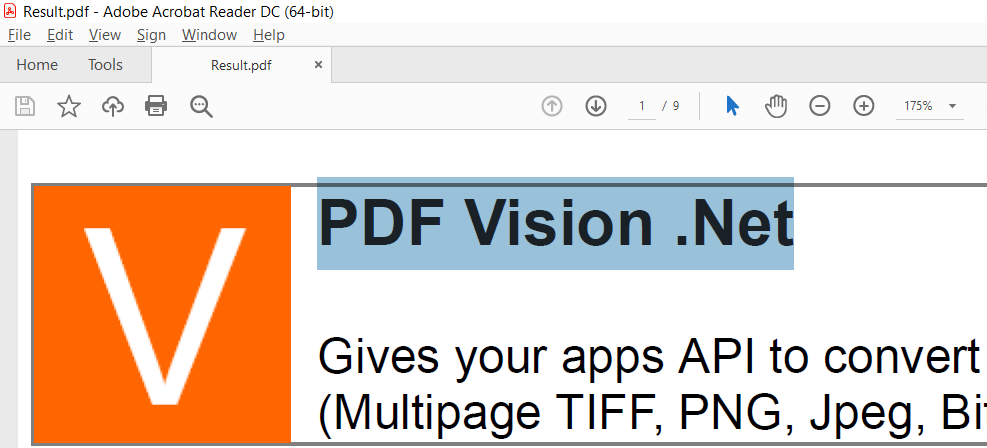
Now the produced PDF documents are completely editable containing formatted text, vector and raster graphics. Note, the previous version 5.x produced PDF documents with HTML screenshots inside, which was affected to the quality during scaling the document.
![Complete editable PDF]()
EnjoyThe new version is completely compatible with all modern versions of .NET Core and .NET 5, 6.
PDF Vision .Net now supports platforms .NET 5 and .NET 6.
![dot-net-6-platform]()
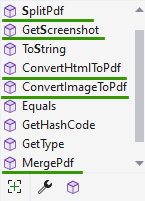
Completely reformed and simplified the API, now it has only five overloaded methods:
![Simplified API]()
Thus, you can quickly find the desired method and integrate it into your code.
To get to know more about all PDF Vision .Net features, we've prepared for you new collection of interesting Code Examples.
5.6.8.10 - August 10th, 2021
We've prepared the new release of PDF Vision .Net 5.6.
-
We've improved the Tiff graphics engine! Now the "HTML to Tiff direction" is more stable and has better quality.
-
Added support for Windows 11 and Microsoft Edge v.92.
-
Since version 5.6, PDF Vision .Net fully supports Windows Server 2022.
-
Fixed many minor bugs.
5.5.5.28 - May 28th, 2020
We've prepared the new release of PDF Vision .Net 5.5:
-
Special Offer. In this troubled time, when many Companies are trying to maintain their existence and at the same time find an opportunity for further development. SautinSoft Company offers you to use a fully functional version of our component without any restrictions.
We can provide you by with the fully functional serial key for the product, this key will be valid until September 2020.
Then you will decide on the future use of this component in your projects.
![anti-crisis]()
-
Download the special version (5.5.5.28) of the component or install it from Nuget.
-
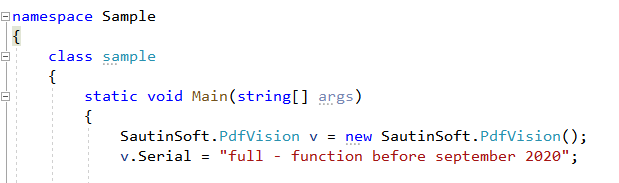
Use this key: obj.Serial = "full-function before september 2020";
-
Enjoy the fully functional version.
Improved image processing on the page and optimized formats: TIFF, PNG, JPG.
Bug fixed with exceptions when working on IIS and Windows Server 2016.
5.4.2.21 - February 21st, 2020. New major version of the PDF Vision .Net 5.4!
-
DLL: Added support for .NET Framework 4.6.1, 4.7, 4.8. Now even more features and functionality.
![.NET Framework 4.6-.48]()
Updated code examples.
5.3.6.5 - June 5th, 2019. We are glad to introduce updated «PDF Vision .Net» 5.3!
-
Updated code examples.
-
Fixed minor issues from our customers, thereby the component became more error-free.
-
Fixed a bug with "TIFF to PDF" conversion. The problem was solved, when some Tiff files were not converted properly. Updated Tiff codec inside.
-
Browser support has been improved: Chrome v.69, Opera v.55, IE v.11, Edge v.41, FireFox v.62.
-
Updated work with HTML 5.2 and CSS 3. Engine for displaying HTML pages: WebKit, Gecko, Blink.
5.2.12.7 - December 7th, 2018. New major version of the PDF Vision .Net 5.2.12:
-
LibTiff .Net sources updated.
-
Tiff Files - increased processing speed 2 times.
-
Fixed minor issues.
5.2.8.22 - August 22nd, 2018. We are glad to introduce «PDF Vision .Net» 5.2.8!
-
Compression = Fast mode is now by default.
-
Fixed minor issues.
5.2.3.17 - March 17th, 2018. New major version of the PDF Vision .Net 5.2!
-
Fixed: Some Tiff files had a mirror result.
-
Improved work with "data:image/png;base64".Now, it works faster.
5.1.11.26 - November 26th, 2017. We are happy to offer new major version of the PDF Vision .Net 5.1.11! What's new in this release:
-
Fixed: Issue is the background color not showing in the second page and third page.
-
Fixed a bug with converting Tiff images and the appearance of a single page, instead of a multi-page document.
-
Fixed a bug when the Method �MergePDFStreamArrayToPDFStream� has trouble with PDF v1.7.
5.1.2.13 - February 13th, 2017. We are glad to introduce «PDF Vision .Net» 5.1!
-
We have fixed the issue with "System.Image.Drawing" can not load such a voluminous document.
-
Fixed the bug with "Page {page} of {numpages}".
5.0.11.22 - November 22nd, 2016. We are glad to introduce updated «PDF Vision .Net» 5.0!
-
Now the PDF Vision .Net can help you to convert ASPX page with filled form data to PDF.
Let us say, you have created an aspx page with a lot of forms (text boxes, list boxes, checkboxes etc). Next these forms were filled at the client side and PDF Vision .Net in conjunction with "ApplicationState" will easily convert this filled aspx to PDF format on fly.
5.0.4.1 - April 1st, 2016. We are happy to offer new «PDF Vision .Net» 5.0! Let's see the details:
-
The main innovation is adding of "Edge mode" into the component. Rest assured, the new PDF Vision .Net in conjunction with "Edge mode" now can convert any HTML page to PDF or Images even with the most modern CSS.
-
Officially added the HTML to Image conversion direction. Now PDF Vision .Net provides you API to get Bitmap, Jpeg or PNG from any HTML document.
-
Added new assemblies "SautinSoft.PdfVision.dll" compiled for x64 platform.
-
Added a lot of new code C# and VB.NET examples for VS 2012 - 2015.
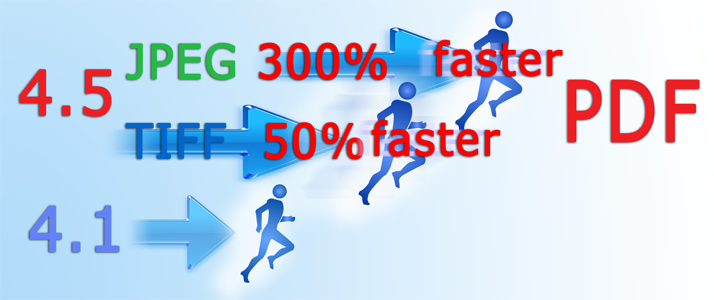
4.5.7.10 - July 10th, 2013. We are proud to offer the new PDF Vision .Net 4.5! You will likely be surprised at the converting speed of images to PDF. The main goal of this version was the speed. You are wondering is it a really fast component? We would be a very appreciate you if you will find a component which converts JPEG and TIFF to PDF faster than PDF Vision .Net.
Now let's get to know the core improvements:
-
Added a new staggering engine which converts Jpegs to PDF on 300% faster than the version 4.1. Furthermore, the new image converting engine is absolutely standalone and doesn't depend of annoying System.Drawing.Image class.
-
Another point of interest is that PDF Vision .Net now processes all types of TIFF images even with FAX compression. A new streamlined TIFF to PDF engine works on 50% faster!
![news]()
4.1.5.25 - May 25th, 2012. We are happy to offer new major version of the PDF Vision .Net 4.1! What's new in this release:
-
Added new property JPEGQuality which allows to control jpeg compression ratio and reduce PDF document size. Typically the only thing that the user can control in Jpeg compression is the quality setting.
4.0.12.12 - December 12th, 2011. We are happy to offer new major version of the PDF Vision .Net 4.0! What's new in this release:
-
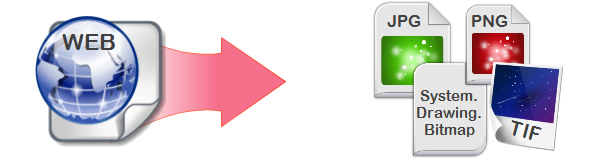
Added new converting direction: HTML to Image! Now the component can convert HTML to Jpeg, Png, TIFF and System.Drawing.Bitmap:
![news]()
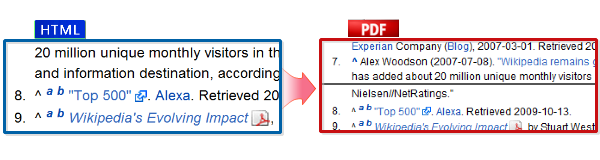
Automatic page breaks for HTML to PDF converting:
![news]()
Increased the speed of conversion in 1.7 times (compare with 3.6).
Added new property SautinSoft.PdfVision.CImageStyle.HtmlTimeOutForScripts. This property will be helpful to convert Web-pages containing a lot of Javascript which require extra time to render page.
Fixed a bug with popup window "Save changes" after closing PDF.
Fixed minor issues.
3.6.5.12 - May 12th, 2011. We are happy inform about releasing new version of the PDF Vision .Net! What's new in this release:
-
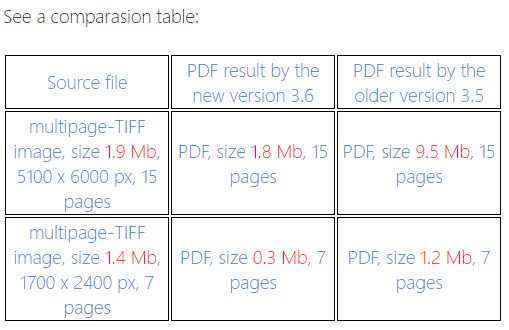
Significantly improved the engine of converting black-and-white images TIFF to PDF. The produced PDF results now have a weight in 7-9 times less compare with previous versions. The whole converting process now works faster in 3-4 times.
![news]()
Added new properties SautinSoft.PdfVision.CImageStyle.Width and SautinSoft.PdfVision.CImageStyle.Height which allows to set custom width and height for images in mm, inches and pixels.
Improved the demo application.
Fixed some minor issues.
3.5.10.21 - October 21th, 2010
-
Names for converting methods and properties became easy and clear.
-
Added a lot of new code samples.
-
Improved demo application.
-
Fixed issue with converting of multipage TIFF to PDF.
-
Added new property SautinSoft.PdfVision.CImageStyle.Quality.
-
Added new property SautinSoft.PdfVision.CImageStyle.FitImageToPageSize.
3.1.7.5 - July 5th, 2010
-
Fixed issue in converting of TIF, GIF and PNG to PDF in ASP.Net applications. This bug appeared after adding new algorithm to increase image quality in PDF. The issue was in that component was returning null during TIF, PNG, GIF to PDF when it worked in Medium Trust Level. In Full Trust level this issue was hidden.
3.1.6.4 - June 4th, 2010
-
Added new properties SautinSoft.PdfVision.CPageStyle.PageHeader and SautinSoft.PdfVision.CPageStyle.PageFooter which allows to specify page header and footer in HTML and Image formats.
-
Added new property SautinSoft.PdfVision.CPageStyle.PageNumbers to specify page numbers. Now it's easy to specify page numbers in top or bottom of page, set number format "Page 1 of N" , set font face, size, color and alignment.
-
Significantly improved quality of produced PDF. Now it doesn't look fuzzy.
-
Reformed and improved Help Manual.
2.2.1 - February 3rd, 2010
-
Added new property 'HtmlWidth' for HTML to PDF converting.
-
Added two methods to merge PDF documents in memory.
-
Added a new sample code C#/VB.NET how to merge PDF in memory in ASP.NET application.
2.1.1.2 - January 29th, 2010
-
New quality of HTML to PDF engine.
-
Fixed issue in Landscape page orientation.
June 23th, 2009 - We are happy to inform about releasing the version 2.0.1. So what's new:
-
New method to split PDF document, which allows to split complete document by pages.
-
New method to merge PDF files into one single document.
April 9th, 2009 - Released version 2.0. We've added the HTML to PDF direction into PDF Vision .Net. We've revised all interface of component, added new methods for image converting. The component have got new demo program with friendly interface.
April 7th, 2008 - version 1.2 released. Added support of converting multipage TIFF to PDF.
August 20th, 2007 - version 1.1 released. Fixed some minor issues.
May 11th, 2007 - version 1.0 released. PDF Vision .Net is a .NET component to convert images: GIF, JPEG, WMF, BMP, TIFF, PNG to PDF.
-
-
-